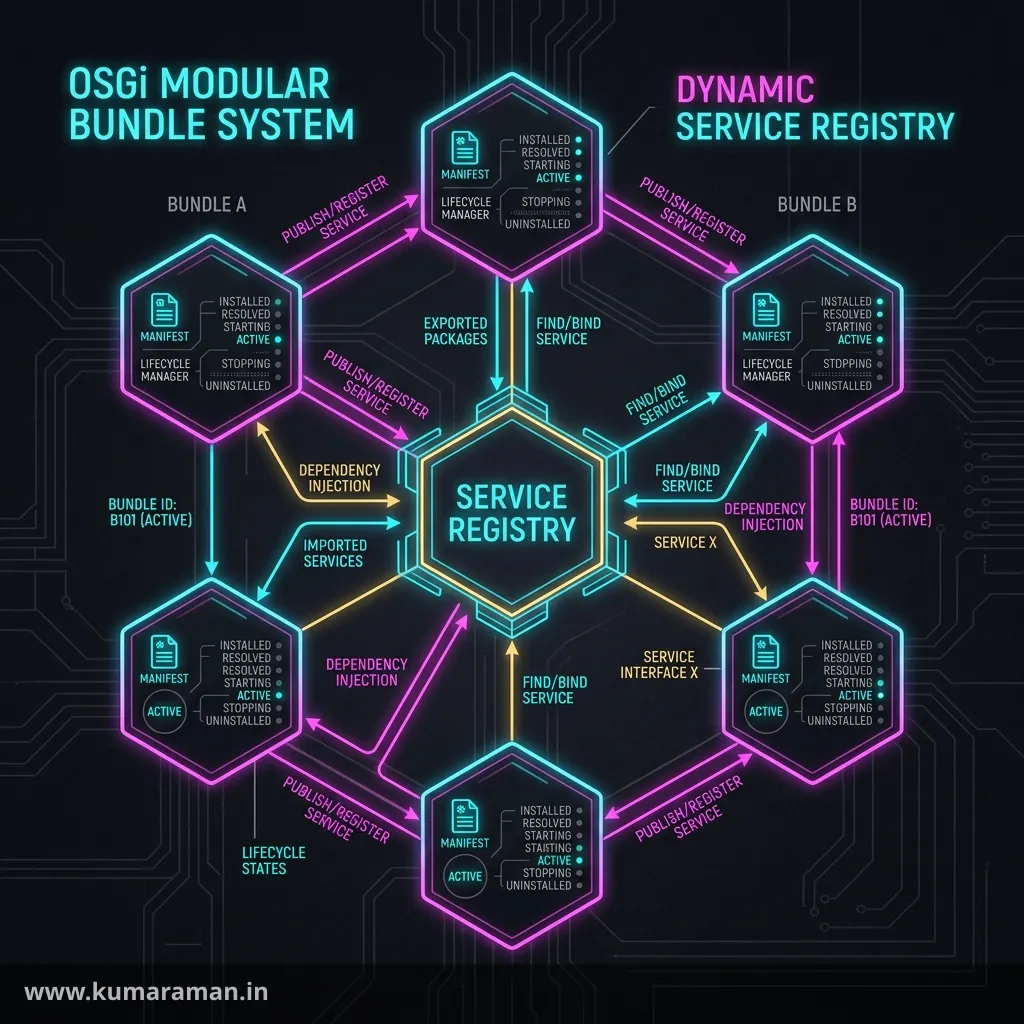
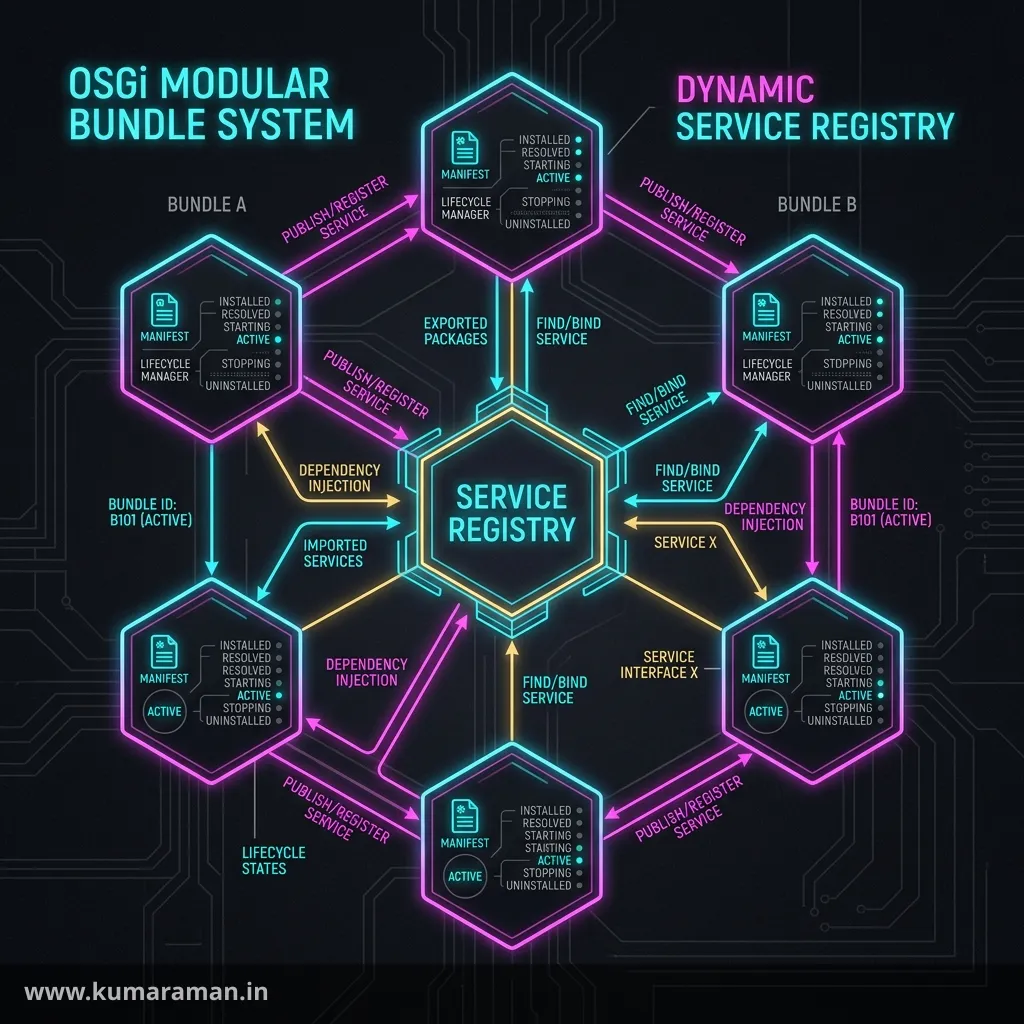
Every line of Java you write for AEM runs inside OSGi. It's the module system that lets AEM load, start, stop, and reconfigure code at runtime without a restart — and it's the layer that turns your classes into services other code can discover and consume. You can copy @Component and @Reference from examples and get by for a while, but the moment you need a configurable service, two implementations of the same interface, or multiple instances of one component, OSGi stops being optional knowledge. This guide is about mastering it.
We'll go from the fundamentals — bundles, components, and services — through references and Configuration Admin, then into the parts that separate competent AEM developers from confident ones: service ranking, factory configurations, and the component lifecycle. There's runnable code throughout, plus a cheat sheet, best practices, and do's & don'ts.
It builds on the Annotations reference (which catalogs every annotation) and the AEM Developer Cheat Sheet (for the wider stack); here we focus on the OSGi concepts behind those annotations.
OSGi in one paragraph
OSGi is a dynamic module system for Java. In AEM it's provided by Apache Felix, and your code is delivered as bundles — ordinary JARs with extra metadata in their manifest declaring what packages they export and import. Inside those bundles, the Service Component Runtime (SCR) manages your components, and components can publish themselves as services in a shared registry where other components find them. The whole thing is dynamic: bundles can start and stop, services can come and go, and configuration can change — all while the server keeps running. That dynamism is exactly why AEM can hot-deploy code and reconfigure services on the fly.
You inspect all of this in the Web Console (/system/console): bundles at /system/console/bundles, components at /system/console/components, services at /system/console/services, and configuration at /system/console/configMgr.
Components
A component is a Java class whose lifecycle is managed by the OSGi runtime. You declare one with the @Component annotation, and from that point SCR is responsible for creating it, injecting its dependencies, and activating it when everything it needs is available.
@Component(immediate = true)
public class StartupLogger {
    // managed by OSGi
}
It's important to separate two ideas that beginners conflate. A bundle is the deployable unit — the JAR you ship. A component is a managed object inside a bundle. One bundle typically contains many components.
A component is also a small state machine, and knowing the states helps enormously when debugging "why isn't my code running?":
| State | Meaning |
|---|---|
| Unsatisfied | A mandatory dependency (a @Reference or required config) is missing |
| Satisfied | All dependencies are available, ready to activate |
| Active | Activated and running |
The immediate flag controls when a satisfied component activates. With immediate = true it activates as soon as it's satisfied; otherwise (the default for service components) it's delayed — activated lazily the first time something actually uses its service. Use immediate = true for components that must run on startup, like listeners or schedulers.
Tip: If a component isn't working, open
/system/console/componentsand check its state. "Unsatisfied" almost always means a missing@Referenceor a required@Designateconfiguration that hasn't been provided.
Services
A component becomes a service when it publishes itself under one or more interfaces, making it discoverable by other components. This is the heart of OSGi's decoupling: consumers depend on an interface, not on a concrete class, and OSGi connects them through the service registry.
// The contract
public interface GreetingService {
    String greet(String name);
}

// The implementation, published as a service
@Component(service = GreetingService.class)
public class GreetingServiceImpl implements GreetingService {
    @Override
    public String greet(String name) { return "Hello, " + name; }
}
The service attribute is what registers the class in the registry under GreetingService. Any other component can now ask for a GreetingService without knowing — or caring — which class implements it. If you omit service, the component is managed but not published as a service (useful for Runnable schedulers or pure lifecycle components).
References
A reference is how a component consumes a service. You declare one with @Reference, and OSGi injects the matching service — and, just as importantly, lets you describe how the dependency should behave.
@Component(service = ArticleService.class)
public class ArticleServiceImpl implements ArticleService {

    @Reference
    private GreetingService greetingService;   // mandatory, static

    @Reference(cardinality = ReferenceCardinality.OPTIONAL,
               policy = ReferencePolicy.DYNAMIC)
    private volatile AuditService auditService; // optional, may come and go

    @Reference
    private List<ContentHandler> handlers;      // all handlers, ranked
}
Three settings shape a reference's behavior, and understanding them prevents a lot of subtle bugs:
- Cardinality — how many, and whether required.
1..1(mandatory, single — the default),0..1(optional, single),1..n(at least one),0..n(any number). Optional references let your component start even when the dependency is absent. - Policy —
STATIC(the default) deactivates and reactivates the component when the service changes;DYNAMICswaps the service in place without restarting the component. Dynamic references should bevolatile. - Policy option —
RELUCTANT(default) keeps the currently bound service;GREEDYrebinds to a better match (e.g. a higher-ranked one) when it appears.
Injecting a List (cardinality 0..n or 1..n) collects every service registered under the interface — the foundation of a plugin pattern, where each plugin is just another service. You can also narrow which service binds with a target filter (an LDAP-style expression on service properties).
Configuration Admin
Hard-coding values like API endpoints or timeouts is a non-starter when the same code runs in dev, stage, and prod. OSGi solves this with the Configuration Admin service: a central store that holds configuration and delivers it to your component, where it can be changed at runtime through the Web Console or shipped as code per environment.
Every configurable component is identified by a PID (persistent identifier — by default, the component's fully-qualified class name). Configuration Admin matches a stored configuration to a component by PID and hands it over when the component activates.
You ship configuration as code in your ui.config module, as .cfg.json files placed in run-mode folders so each environment gets the right values:
ui.config/.../config.author.prod/com.mysite.core.MyServiceImpl.cfg.json{
"endpoint": "https://api.example.com",
"timeout": 5000
}The most specific run-mode folder wins, so a value in config.author.prod overrides the same key in config.author, which overrides plain config. (For how the configuration schema is defined with @ObjectClassDefinition, see the Annotations reference and the lifecycle section below.)
DS Annotations
The way you declare all of the above is through Declarative Services (DS) annotations from org.osgi.service.component.annotations. At build time, the bnd tool reads these annotations and generates the XML component descriptors (under OSGI-INF/) that SCR uses at runtime — so you write clean annotated Java and never touch the XML yourself.
The core set is small:
| Annotation | Role |
|---|---|
@Component | Declare a component / register a service |
@Reference | Consume another service |
@Activate / @Modified / @Deactivate | Lifecycle callbacks |
@Designate | Bind a configuration definition to the component |
@ObjectClassDefinition / @AttributeDefinition | Define the configuration schema (metatype) |
Important: Use the OSGi DS annotations, not the old Felix SCR annotations (
org.apache.felix.scr.annotations—@Service,@Property, and a different@Reference). The Felix ones are deprecated, and mixing the two families in one class produces baffling, broken components. The Annotations reference covers each DS annotation in depth.
Service ranking
When two components implement the same service interface, OSGi needs a tie-breaker — and that's service ranking. It's an integer property (service.ranking); when a consumer binds a single service (1..1), OSGi picks the highest-ranked one. When a consumer injects a List, the services are delivered sorted by ranking.
@Component(
    service = PriceCalculator.class,
    property = { Constants.SERVICE_RANKING + ":Integer=100" })
public class PromoPriceCalculator implements PriceCalculator { }
This is the standard mechanism for overriding a default service: give your implementation a higher ranking than the one you want to replace (Adobe's default services typically sit at the default ranking of 0), and consumers automatically bind yours instead. Combined with the GREEDY policy option on the consumer's reference, a newly deployed higher-ranked service can take over without a restart.
Tip: Ranking only matters when more than one service shares an interface. If your override isn't taking effect, confirm both implementations are actually registered under the same interface in
/system/console/services.
Factory configurations
A normal component is a singleton — one instance, one configuration. But sometimes you need several instances of the same component, each configured differently: three content importers pointing at three feeds, or one scheduled job per region. That's what a factory configuration provides.
You declare a factory by setting factory = true on the @Designate:
@Component(service = FeedImporter.class)
@Designate(ocd = FeedImporter.Config.class, factory = true)
public class FeedImporter implements Runnable {

    @ObjectClassDefinition(name = "Feed Importer (factory)")
    public @interface Config {
        @AttributeDefinition(name = "Feed URL")
        String feedUrl();
        @AttributeDefinition(name = "Schedule")
        String cron() default "0 0 * * * ?";
    }

    @Activate
    protected void activate(Config config) { /* one instance per config */ }
}
Now Configuration Admin creates one component instance per factory configuration. Each configuration has a factory PID (the base) plus a unique instance name, and as code the files are named with a ~ separator:
com.mysite.core.FeedImporter~news.cfg.json
com.mysite.core.FeedImporter~blog.cfg.json
Each file produces an independent instance with its own feedUrl and cron. This is the right pattern any time the number of instances is data-driven rather than fixed — a far cleaner approach than hard-coding a list inside one component.
Lifecycle methods: activate, modified, deactivate
A component's lifecycle is where you set up state, react to configuration changes, and clean up. Three annotated methods cover it, and getting them right is what makes a component robust.
@Component(service = MyService.class, immediate = true)
@Designate(ocd = MyService.Config.class)
public class MyServiceImpl implements MyService {

    private String endpoint;
    private ScheduledExecutorService executor;

    @Activate
    @Modified
    protected void activate(Config config) {
        this.endpoint = config.endpoint();   // read config on start AND on change
    }

    @Deactivate
    protected void deactivate() {
        if (executor != null) executor.shutdownNow();  // release resources
    }
}
Here's what each one does and when it fires:
@Activateruns when the component becomes active — all references satisfied and configuration available. This is where you read configuration and initialize state. It can receive the configuration object, aComponentContext, aBundleContext, or aMapof properties.@Modifiedruns when the component's configuration changes. The crucial trick is to annotate the same method with both@Activateand@Modified: a config change then re-runs your setup in place, without OSGi deactivating and recreating the component. Omit@Modified, and every configuration change triggers a full deactivate/activate cycle instead.@Deactivateruns when the component stops — bundle stopped, dependency lost, or instance removed. Use it to release everything you acquired: thread pools, connections, listeners, resource resolvers.
Important: Always release resources in
@Deactivate. Because OSGi recreates components dynamically, a component that opens a thread pool or a resource resolver in@Activatebut never closes it in@Deactivatewill leak on every redeploy — a classic, slow-burning AEM memory leak.
Cheat sheet
| Concept | Key API | In one line |
|---|---|---|
| Component | @Component | A runtime-managed class |
| Service | @Component(service = X.class) | A component published under an interface |
| Reference | @Reference (cardinality, policy) | Consume another service |
| Config schema | @ObjectClassDefinition + @Designate | Define editable configuration |
| Config delivery | .cfg.json in run-mode folders | Per-environment values |
| Service ranking | service.ranking property | Pick/override among same-interface services |
| Factory config | @Designate(factory = true) | Many instances, one per config |
| Activate | @Activate | Read config, init state |
| Modified | @Modified (same method) | Apply config change without restart |
| Deactivate | @Deactivate | Release resources |
| Inspect | /system/console | bundles, components, services, configMgr |
Best practices
- ✅ Use OSGi DS annotations exclusively — never the deprecated Felix SCR ones.
- ✅ Depend on interfaces, not implementations, and let OSGi wire them.
- ✅ Ship configuration as
.cfg.jsonin run-mode folders so each environment differs cleanly. - ✅ Annotate one method with both
@Activateand@Modifiedto apply config changes without a restart. - ✅ Release every resource in
@Deactivatethat you acquired in@Activate. - ✅ Use factory configurations when the number of instances is data-driven.
Do's and Don'ts
Do
- ✅ Check
/system/console/componentsfor the state when a component "doesn't run." - ✅ Use
service.ranking(plusGREEDY) to override a default service cleanly. - ✅ Mark
DYNAMICreference fieldsvolatile.
Don't
- ❌ Don't mix Felix SCR and OSGi DS annotations in one class.
- ❌ Don't hard-code environment values — use Configuration Admin.
- ❌ Don't forget
@Designate(ocd = ...), or your configuration never binds. - ❌ Don't leak thread pools, connections, or resolvers — clean up in
@Deactivate. - ❌ Don't assume a single implementation — ranking decides which service wins when there are several.
Wrapping up
OSGi is the runtime your AEM code lives in, and mastering it pays off everywhere. Once you can distinguish a bundle from a component from a service, wire dependencies with the right reference cardinality and policy, configure components through Configuration Admin, override defaults with service ranking, spin up many instances with factory configurations, and manage state across the activate / modified / deactivate lifecycle, the dynamic nature of AEM becomes a tool you wield rather than a mystery you fight.
From here, the Annotations reference details every annotation used above, the Apache Sling guide shows OSGi services powering content access, and the Component Development guide ties it all together in a working feature.
Discussion
Loading discussion…
Try a related tool
Subscribe to the Newsletter
Get the latest articles, tutorials, and tech insights delivered straight to your inbox. No spam, unsubscribe anytime.