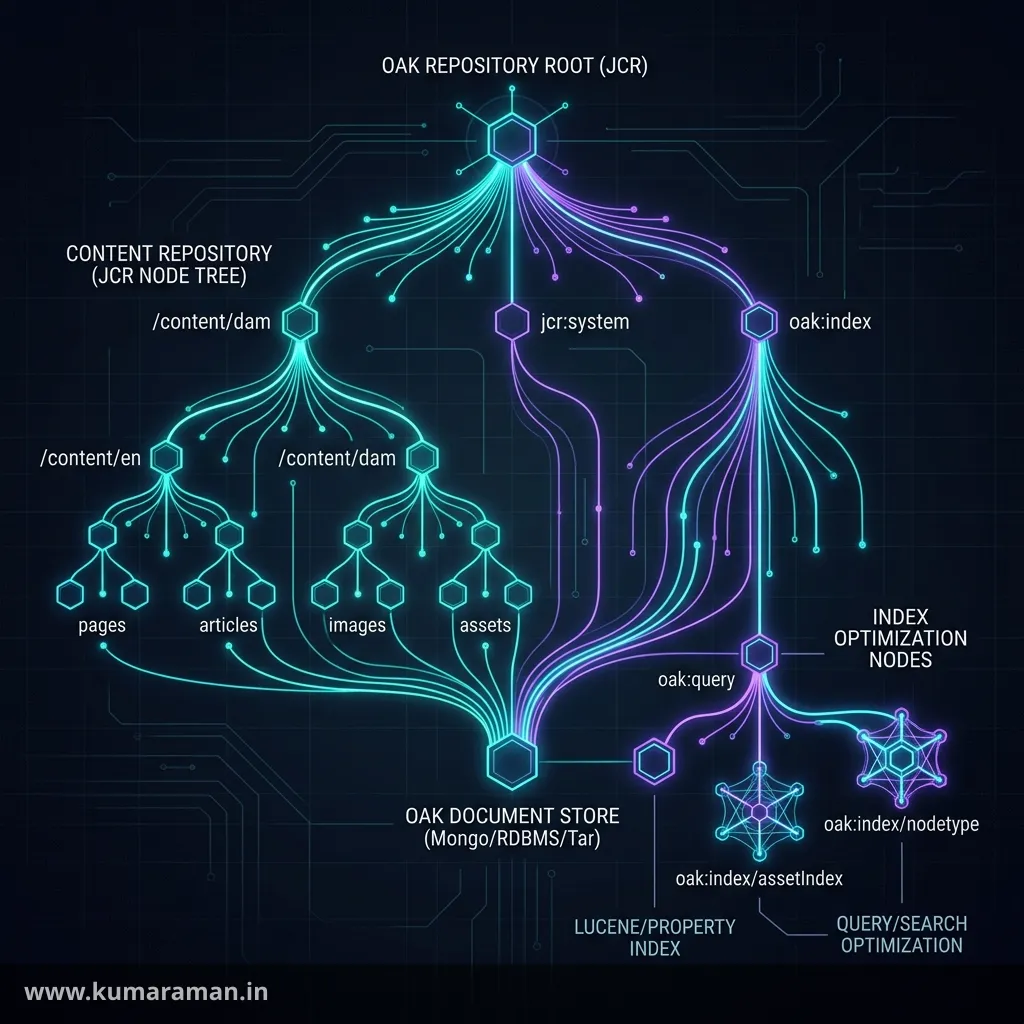
Underneath every AEM page, asset, configuration, and user account sits one thing: the content repository. In AEM that repository is Apache Jackrabbit Oak, an implementation of the JCR (Java Content Repository) standard, and it is the foundation the entire platform is built on. Most AEM performance problems — and a surprising number of correctness bugs — come down to not understanding how the repository stores data and how it runs queries.
This guide takes you from the basics of the JCR tree all the way to diagnosing a slow query in production. You'll learn how content is structured into nodes and properties, what node types are and why they matter, how to write efficient JCR-SQL2 and XPath queries, why Oak requires indexes, how Oak is architected, and — the part every senior developer needs — how to analyze and fix slow queries. A cheat sheet, best practices, and do's & don'ts round it out.
For where the repository fits in the wider platform, see the AEM Developer Cheat Sheet; for how your code reads it, the Apache Sling guide.
What the JCR is
The JCR (specified as JSR-283, JCR 2.0) defines a standard Java API for a hierarchical content repository — essentially a tree-shaped database designed for content rather than rows and tables. The guiding principle, the same one that echoes throughout AEM, is that everything is content: a web page is content, but so is a template, a configuration value, an OSGi setting, and a user. They all live as nodes in one tree.
Oak is the modern, scalable implementation of that API used by AEM 6.x and AEM as a Cloud Service. So when you hear "JCR," think of the API and data model; when you hear "Oak," think of the engine that actually stores and queries the data. You write against JCR; Oak makes it fast and clustered.
JCR structure
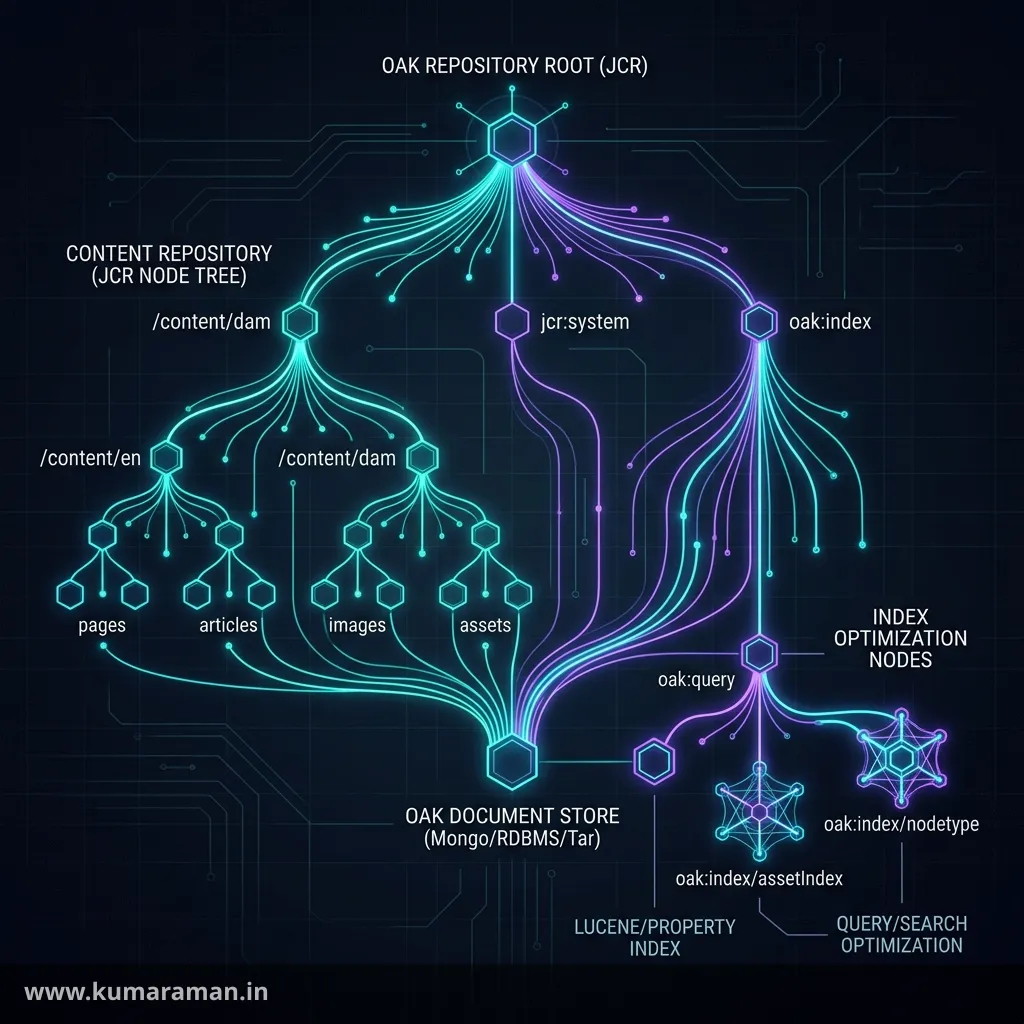
The repository is a single tree with a root node (/), and everything hangs off it. Each location is addressed by a path, exactly like a file system:
/                              ← root
├── content/                   ← pages, assets, experience fragments
│   └── mysite/en/home         ← a page
│       └── jcr:content        ← the page's actual content node
├── apps/                      ← your code (components, templates)
├── conf/                      ← editable templates, policies, CA config
├── home/                      ← users and groups
└── oak:index/                 ← query indexes
A few structural facts shape how you work:
- The repository is organized into a workspace (in AEM, a single workspace named
crx.default). - A path like
/content/mysite/en/home/jcr:content/titlewalks from the root through nodes to a final property. - A node named
jcr:contentis a near-universal convention: it holds the real content of its parent (a page's properties and component tree live in the page node'sjcr:content, not the page node itself).
Nodes & properties
The repository is built from just two kinds of things, and understanding the distinction is fundamental.
A node is a point in the tree. It has a name, exactly one primary node type, optional mixin types, child nodes, and properties. A property is a name-value pair attached to a node — this is where actual data lives. Properties are strongly typed, and a property can hold a single value or multiple values.
node:  /content/mysite/en/home/jcr:content   (type: cq:PageContent)
  ├── property  jcr:title       = "Home"            (String)
  ├── property  jcr:created     = 2026-06-01T...     (Date, protected)
  ├── property  cq:template     = "/conf/.../home"   (String)
  ├── property  keywords        = ["aem", "jcr"]     (String[], multi-value)
  └── child node  root          (type: nt:unstructured)
JCR defines a fixed set of property types, and choosing the right one matters for both storage and querying:
| Type | Use for |
|---|---|
String | Text |
Long / Double / Decimal | Numbers |
Boolean | Flags |
Date | Timestamps (range queries work) |
Binary | File content (stored via the BlobStore) |
Name / Path | References to node types or paths |
Reference / WeakReference | Pointers to other nodes (by UUID) |
Some properties are protected — set by the system and not directly writable — such as jcr:primaryType, jcr:created, and jcr:uuid. You'll also constantly see namespaced names: jcr:* (the JCR standard), cq:* and dam:* (AEM), and sling:* (Sling). The namespace tells you who owns the property's meaning.
Tip: When reading properties in Java, prefer Sling's
ValueMap(resource.getValueMap().get("jcr:title", String.class)) over the raw JCRPropertyAPI — it's type-safe, null-safe, and supports defaults. See the Sling guide for Resource vs Node.
Node types
Every node has a node type that defines what it is and what it's allowed to contain — which properties are valid, which child nodes are permitted, and whether they're required. Node types are the repository's schema, and AEM ships a rich set:
| Node type | Represents |
|---|---|
nt:unstructured | A flexible node — any properties, any children (AEM's workhorse) |
nt:folder / sling:Folder / sling:OrderedFolder | Folders |
cq:Page / cq:PageContent | A page and its content node |
dam:Asset / dam:AssetContent | A DAM asset |
nt:file / nt:resource | A file and its binary |
cq:Component | A component definition |
cq:ClientLibraryFolder | A client library |
Alongside the primary type, a node can carry mixins — secondary types that add capabilities:
| Mixin | Adds |
|---|---|
mix:versionable | Versioning support |
mix:referenceable | A stable jcr:uuid so the node can be referenced |
mix:lockable | Locking |
mix:title | Standard title/description properties |
The most important practical distinction is structured vs unstructured. nt:unstructured imposes no constraints, which is why AEM uses it almost everywhere — components can store whatever an author's dialog defines. Strict node types (like cq:Page) enforce a known shape. New node types are declared in CND (Compact Node Definition) notation, but on most projects you'll reuse the built-in types rather than define your own.
Queries
Sometimes you can't navigate to content by path — you need to find it: "all articles tagged 'aem' published this year." That's a query, and AEM gives you three ways to write one:
- JCR-SQL2 — the modern, recommended query language; SQL-like and readable.
- XPath — the older syntax; still extremely common because AEM's QueryBuilder compiles to it under the hood.
- QueryBuilder — an AEM-specific predicate API (the full Query Builder reference covers it) that's the friendliest from Java and HTTP, and that generates one of the two languages above.
To experiment with JCR-SQL2 or XPath directly, use the repository's SQL2/XPath query tools (CRXDE Lite's query tab, or -Explain- in the Developer Console). The similarly-named Query Debugger console at /libs/cq/search/content/querydebug.html is a different tool — it takes QueryBuilder predicates, not SQL2 or XPath, and is covered in the Query Builder reference.
SQL2
JCR-SQL2 looks like SQL but operates on the node tree. You select from a node type and constrain by path and properties. The path functions are the key idioms:
-- All article pages under /content/mysite tagged "aem"
SELECT * FROM [cq:Page] AS page
WHERE ISDESCENDANTNODE(page, '/content/mysite')
  AND page.[jcr:content/cq:template] = '/conf/mysite/.../article'
  AND page.[jcr:content/cq:tags] = 'mysite:topic/aem'
ORDER BY page.[jcr:content/jcr:created] DESC
The functions you'll use most are ISDESCENDANTNODE(x, '/path') (anywhere below a path), ISCHILDNODE(x, '/path') (direct children only), and ISSAMENODE. For full-text search there's CONTAINS(x.*, 'term'), and you can JOIN two selectors when you need to relate parent and child nodes. Selecting specific columns instead of * and adding an ORDER BY on an indexed property keeps results lean.
XPath
XPath predates SQL2 in JCR but is far from dead — QueryBuilder emits it, so you'll read it constantly in logs and debugging. The same article query in XPath:
/jcr:root/content/mysite//element(*, cq:Page)
  [jcr:content/@cq:template = '/conf/mysite/.../article']
  order by jcr:content/@jcr:created descending
Here // means "descendants," element(*, cq:Page) filters by node type, [@prop = '...'] constrains properties, and jcr:contains(., 'term') does full-text. Functionally it's equivalent to SQL2 — pick SQL2 for new code, but be fluent enough in XPath to read what QueryBuilder produces.
Indexing
This is the single most important section for performance, so read it carefully: Oak does not scan the repository for you. Unlike older Jackrabbit, Oak will only run a query efficiently if there's an index that covers it. Without one, Oak falls back to traversal — walking nodes one by one — which is slow, and which Oak warns about in the logs. On a large repository, an unindexed query can read hundreds of thousands of nodes and bring the instance to its knees.
Indexes are themselves content, stored under /oak:index as oak:QueryIndexDefinition nodes. There are a few kinds:
- Property index — fast lookups on a specific property (
type = "property"). - Lucene index — full-text and complex/multi-property queries (
type = "lucene"), and the most common type you'll define. - Ordered index — supports efficient
ORDER BY.
A minimal custom Lucene index definition looks like this:
<jcr:root xmlns:jcr="http://www.jcp.org/jcr/1.0"
          xmlns:oak="http://jackrabbit.apache.org/oak/ns/1.0"
          jcr:primaryType="oak:QueryIndexDefinition"
          type="lucene"
          async="async"
          compatVersion="{Long}2"
          includedPaths="[/content/mysite]">
  <indexRules jcr:primaryType="nt:unstructured">
    <cq:Page jcr:primaryType="nt:unstructured">
      <properties jcr:primaryType="nt:unstructured">
        <template jcr:primaryType="nt:unstructured"
                  name="jcr:content/cq:template"
                  propertyIndex="{Boolean}true"/>
      </properties>
    </cq:Page>
  </indexRules>
</jcr:root>
Two operational details matter. Lucene indexes are usually async, meaning they update on a background cycle (typically a few seconds behind writes) rather than instantly — so a freshly written node may not appear in query results for a moment. And on AEM as a Cloud Service, indexes are deployed as code (under /oak:index in your ui.apps package, with a specific naming convention), and changing one triggers a managed reindex during deployment.
Important: Every query you run in production must be backed by an index. "It works on my local with 50 pages" is not a test — traversal looks fine on tiny content and falls over on real volumes.
Oak architecture
Understanding Oak's internals explains a lot of its behavior, especially around clustering and binaries.
At the core, Oak separates the content model from storage through a NodeStore abstraction, and there are two implementations:
- SegmentNodeStore (TarMK) — stores the repository in tar files on local disk. It's fast and used for single-instance, on-prem author and publish.
- DocumentNodeStore — stores nodes as documents in MongoDB or a relational DB, enabling a clustered, shared repository. AEM as a Cloud Service uses a cloud-native document store of this kind.
Binaries (images, PDFs, video) are not kept in the NodeStore. They're offloaded to a BlobStore — a file data store on-prem, or S3/Azure blob storage in the cloud — and the node simply references them. This keeps the content tree small and makes large assets cheap to store.
Two more concepts you'll encounter: Oak uses MVCC (multi-version concurrency control), so reads never block writes and each session sees a consistent revision; and it runs background maintenance — async indexing (updating Lucene indexes) and revision garbage collection / compaction (reclaiming space from old revisions). When you see "the index is a few seconds behind" or "the repository needs compaction," these are the mechanisms responsible.
Repository traversal
There are two fundamentally different ways to find content, and choosing wrong is a top cause of slow code.
Traversal means walking the tree node by node in Java — resource.listChildren() or node.getNodes() in a loop. It's perfectly fine for a known, bounded set of children: iterating the items of a multifield, or the few children of a single component.
// Fine: bounded, known structure
for (Resource child : resource.getChildren()) {
    process(child);
}
What you must not do is traverse a large or unbounded subtree to find something — "loop over every page under /content and check a property." That's an O(n) scan of potentially huge content, and it's exactly the job a query with an index does in milliseconds. The rule is simple: navigate when you know the path, query when you need to search — and make sure the query is indexed.
Query optimization & analyzing slow queries
This is where senior developers earn their keep. When a page is slow or the logs fill with warnings, you need a repeatable way to find the offending query and fix it. Here's the workflow.
1. Recognize the symptom
Oak logs a warning whenever a query traverses too many nodes — the classic message reads like:
org.apache.jackrabbit.oak.query.QueryImpl
Traversed 10000 nodes with filter Filter(query=...) ; consider creating an index
Seeing "Traversed N nodes" or "no index" in the logs is your signal that a query is unindexed and scanning. Raise the verbosity of the org.apache.jackrabbit.oak.query logger to DEBUG temporarily to capture the exact query and its plan.
2. EXPLAIN the query
Before guessing, ask Oak how it will run a query. JCR-SQL2 supports an EXPLAIN prefix, which returns the query plan — including which index, if any, it uses. You can run it from CRXDE Lite's query tab, or paste the generated statement into the Explain Query tool (Tools → Operations → Diagnosis on 6.5, or the Cloud Manager Developer Console's Query Performance tool on AEM as a Cloud Service — see the Query Builder reference for both):
EXPLAIN SELECT * FROM [cq:Page] AS page
WHERE ISDESCENDANTNODE(page, '/content/mysite')
  AND page.[jcr:content/cq:template] = '/conf/mysite/.../article'
If the plan shows a traverse strategy (rather than a named Lucene/property index), the query is unindexed — that's your problem. EXPLAIN MEASURE goes further and reports how many nodes each part actually reads.
3. Inspect the JMX query statistics
Oak tracks slow and popular queries in a JMX MBean. In the Web Console go to /system/console/jmx and open Oak Query Statistics (QueryStats). It lists the slowest queries, the most popular queries, and how often each traversed — an excellent way to find the worst offenders in a running system without digging through logs.
4. Fix it
Most fixes fall into a short list:
- Add or extend an index so the constrained property is indexed (the most common fix).
- Restrict the path with
ISDESCENDANTNODEso the query searches a branch, not the whole tree. - Avoid leading-wildcard
LIKE '%term'and broad//*patterns — they can't use an index efficiently. - Confirm the index is actually used by re-running
EXPLAINafter your change. - Check for async lag — if results are missing right after a write, the async index simply hasn't caught up; that's expected, not a bug.
Tip: On AEM as a Cloud Service, you can't hand-edit
/oak:indexin production. Deploy index definitions as code, validate them locally with the oak-run tooling, and let the deployment's managed reindex apply them. The Index Manager surfaces index status and reindex progress.
Cheat sheet
| Task | How |
|---|---|
| Read a property safely | resource.getValueMap().get("jcr:title", String.class) |
| Get the real page content | the page node's jcr:content child |
| Search below a path (SQL2) | ISDESCENDANTNODE(x, '/content/...') |
| Direct children only (SQL2) | ISCHILDNODE(x, '/content/...') |
| Full-text (SQL2) | CONTAINS(x.*, 'term') |
| See the query plan | EXPLAIN SELECT ..., or paste it into Explain Query |
| Find slow queries | JMX → Oak Query Statistics |
| Spot unindexed queries | logs: "Traversed N nodes / no index" |
| Define an index | oak:QueryIndexDefinition under /oak:index |
Best practices
- ✅ Navigate by path when you know it; query (indexed) when you must search.
- ✅ Back every production query with an index, and verify with
EXPLAIN. - ✅ Always restrict queries by path to the smallest relevant branch.
- ✅ Read properties through Sling's
ValueMap, not the raw JCR API. - ✅ Set
p.limit(QueryBuilder) or a bound — don't fetch unbounded result sets. - ✅ Account for async index lag in code that reads just after writing.
Do's and Don'ts
Do
- ✅ Run
EXPLAIN(or Explain Query) before shipping a query. - ✅ Monitor the Oak Query Statistics MBean on real environments.
- ✅ Deploy indexes as code on AEMaaCS and validate with oak-run.
Don't
- ❌ Don't traverse large subtrees in Java to find content — query instead.
- ❌ Don't run queries without an index "because it works locally."
- ❌ Don't use leading-wildcard
LIKE '%x'or unbounded//*. - ❌ Don't store large binaries as anything but
nt:file/Binary (they belong in the BlobStore). - ❌ Don't assume a just-written node is immediately queryable — async indexes lag.
Wrapping up
The repository is the bedrock of AEM, and most of what makes an AEM application fast or slow happens here. Internalize the model — a tree of nodes and properties, typed by node types — and the two ways to find content: navigate when you know the path, query (always indexed) when you search. Then make the optimization workflow a habit: watch the logs for traversal warnings, EXPLAIN your queries, read the Oak Query Statistics, and fix the index. Do that and you'll keep the repository — and the whole platform — fast.
Continue with the Apache Sling guide for how your code reads the repository, the Component Development guide to put it to use, and the AEM Developer Cheat Sheet for the bigger picture.
Discussion
Loading discussion…
Try a related tool
Subscribe to the Newsletter
Get the latest articles, tutorials, and tech insights delivered straight to your inbox. No spam, unsubscribe anytime.