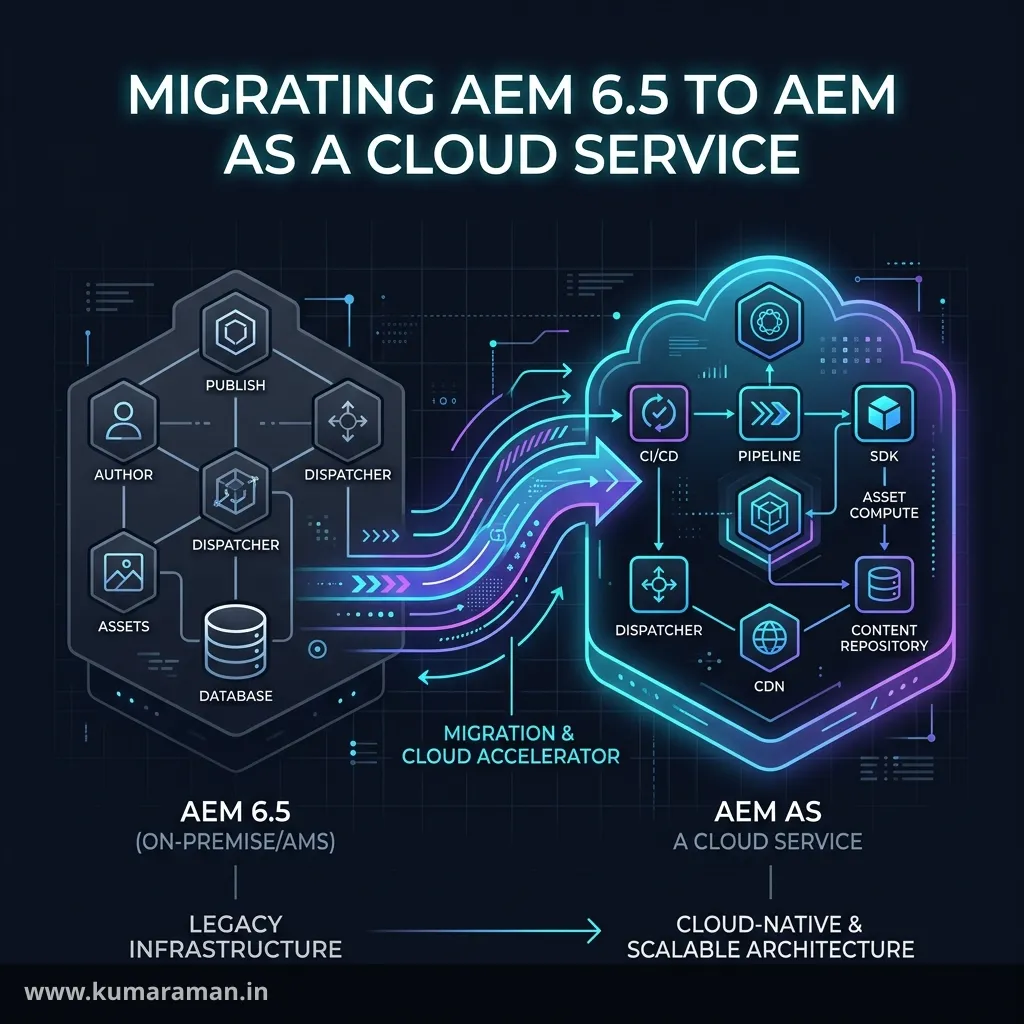
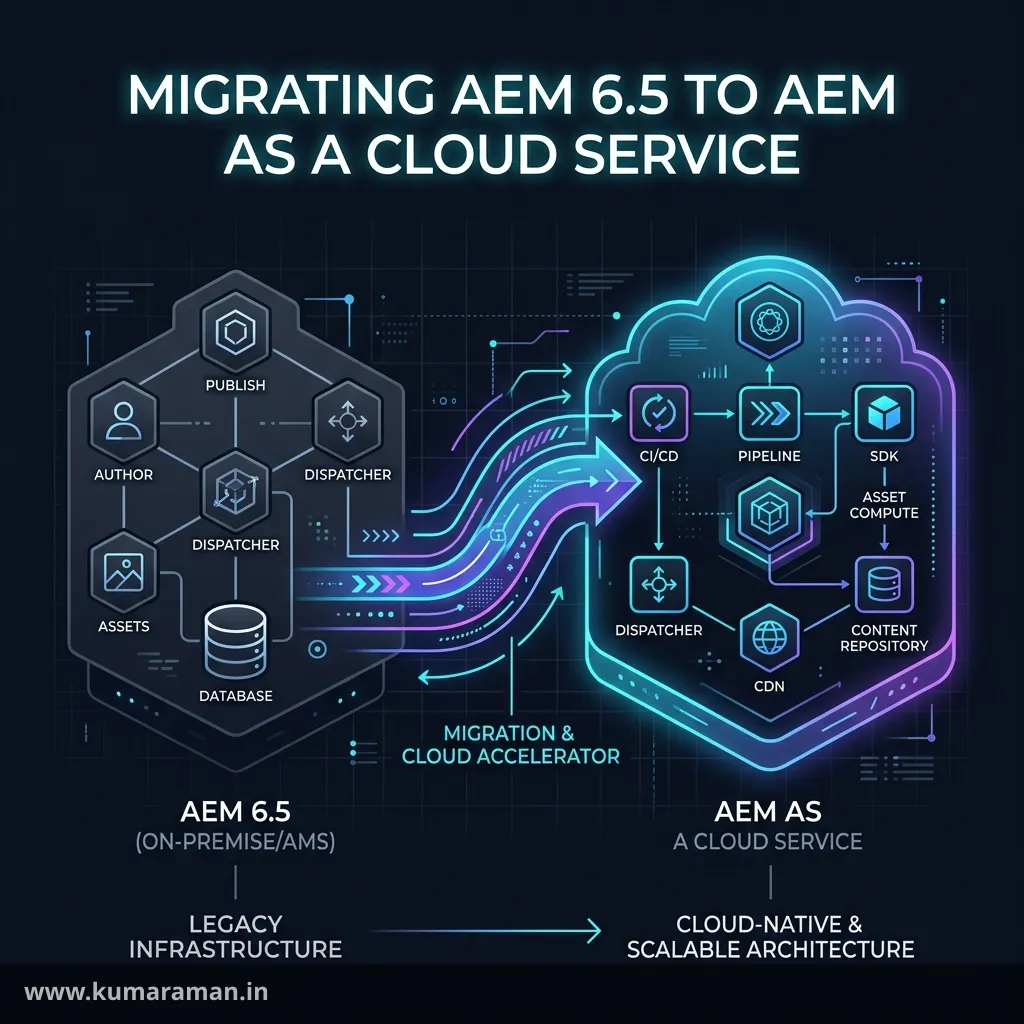
Moving from AEM 6.5 to AEM as a Cloud Service (AEMaaCS) is not an upgrade. No installer turns a 6.5 instance into a cloud one. It's a re-platforming: your code is restructured and refactored for an immutable, container-based runtime, and your content is transferred into a brand-new repository by a dedicated tool. Teams that treat it as "a big service pack" blow their timelines — usually on the same few things: a monolithic content package, a custom replication agent, a heavily customised DAM Update Asset workflow, or custom Oak indexes nobody remembers writing.
This guide walks the journey the way you'd actually run it: what changes and why, the phases Adobe structures the migration into, what the Best Practices Analyzer (BPA) and Cloud Acceleration Manager (CAM) tell you, which refactoring tools exist today (several now live inside CAM), how to convert custom indexes and OSGi configs, how to replace features the cloud doesn't have, how the Content Transfer Tool (CTT) moves content, and how to cut over. Tool names and statuses are checked against Adobe's documentation as of September 2026; fast-moving details are flagged as version-sensitive.
This post is about the move. For day-to-day cloud work — Cloud Manager, pipelines, RDE, environment variables — read the AEM as a Cloud Service guide alongside it. The Dispatcher guide, JCR & Oak guide, OSGi guide, and Assets guide cover the subsystems you'll touch most.
Why migrate at all
The real reasons are operational:
- No more upgrades. Adobe updates AEMaaCS continuously through Cloud Manager with a rolling update pattern — no downtime for author or publish, and no "upgrade project" every few years.
- Elastic capacity. The runtime is containerised, "a fully dynamic system with a variable number of pods, dependent on actual activity," in Adobe's words.
- Managed delivery. A CDN and traffic management are included for author and publish by default.
- Support horizon. At the time of writing, Adobe's KB lists core support for AEM 6.5 on-premise ending February 28, 2027 and extended support ending February 28, 2028, with 6.5 LTS on the same timeline. Check Adobe's current EOL matrix before quoting dates — this is the most version-sensitive fact in this post.
The price is control: no SSH, no Felix web console, no runtime edits to /apps, no custom run modes.
The alternative: AEM 6.5 LTS
If you aren't ready for the cloud, AEM 6.5 LTS is the supported on-premise/AMS path. It went GA in March 2025, upgrades the Felix, Sling and Oak foundations, and supports Java 17 and Java 21. It's an in-place upgrade from a supported 6.5 service pack, so it's far cheaper short-term — but you still own upgrades, infrastructure, and a support end date. It buys time; it doesn't remove the migration. Many cleanups in this guide (service users, .cfg.json, editable templates, Core Components) are worth doing on LTS anyway, because they shrink the eventual cloud move.
What fundamentally changes
Almost every refactoring task traces back to one row of this table.
| Area | AEM 6.5 (on-prem / AMS) | AEM as a Cloud Service |
|---|---|---|
/apps and /libs | Writable at runtime | Immutable — change only by deploying through Cloud Manager |
| Package structure | Often one package mixing code and content | Code and mutable content in separate packages, wrapped by an all package |
| Deployment | Package Manager, CRXDE, anything | Cloud Manager pipelines only |
| Run modes | Any custom run mode | Only author, publish, dev, stage, prod and combinations |
| OSGi config format | .config, .cfg, XML, .cfg.json | .cfg.json only, with $[env:...] / $[secret:...] |
| Publish repository | Writable if you insist | No direct changes except /home |
| Topology | Fixed servers | Author = pod cluster sharing one repository; Publish = farm, each with its own repository; plus a Preview tier |
| Replication | Configurable replication agents | Sling Content Distribution via an external pipeline service; Replicator API still works |
| Asset processing | DAM Update Asset workflow | Asset microservices + processing profiles + post-processing workflows |
| Author login | Local users, LDAP, SAML | Adobe IMS via Admin Console |
| CDN | Bring your own | Adobe-managed CDN included |
| Dispatcher | You own all of Apache | Dispatcher SDK structure, immutable Adobe files, enforced validator |
| Classic UI | Present | Removed |
| Local disk | Durable | Ephemeral |
| CRXDE Lite | Everywhere | Only on author in development environments |
Two rows deserve a sentence each.
Immutability drives most refactoring. Adobe states that content in /apps and /libs "is read-only." That kills runtime overlays, production-edited static templates, and code that writes to /apps. It's also why the repository must be split: Cloud Manager bakes /apps into the immutable image, while mutable content is installed into the running repository.
State lives in the repository or nowhere. Adobe's development guidelines say the disk is disposed of when instances recycle and that background work must assume the instance "can be brought down at any time." File-system writes, long-lived in-memory state, and Sling Commons Scheduler jobs that must run need changing — Adobe recommends Sling Jobs for their at-least-once guarantee.
The migration phases
Adobe's journey and CAM organise the work into Readiness, Implementation, and Go-Live. Add planning in front — it's where migrations are won or lost.
| Phase | What happens | Primary tools |
|---|---|---|
| Planning | Scope, inventory, team, freeze windows | BPA output, spreadsheets |
| Readiness | Assess the estate, size the effort, clean the source | BPA, CAM |
| Implementation | Restructure and refactor code, trial content migrations | CAM Refactoring Service, aio plugin, Modernization Tools, CTT |
| Go-Live | Freeze, final top-up, DNS/CDN cutover, hypercare | CTT, Cloud Manager |
Run them as overlapping streams. Content trials should start while code refactoring is still underway — the first extraction always surfaces something.
Readiness: BPA and Cloud Acceleration Manager
Best Practices Analyzer
BPA is a package from the Software Distribution portal that you install via Package Manager on your source author instance (AEM 6.1 and above). It lives at Tools → Operations → Best Practices Analyzer, is built on Adobe's Pattern Detector, and is read-only — it doesn't modify content or configuration. Generation can take "several minutes to a few hours," and results are cached for 24 hours. Adobe recommends running it on a stage environment close to production, or a clone of production author.
Findings fall into five buckets: functionality to refactor, repository items to move to supported locations, legacy UI to modernise, deployment/configuration issues, and 6.x features replaced or unsupported in the cloud. Each has an importance level:
| Importance | Adobe's meaning | Action |
|---|---|---|
INFO | Informational | Usually none |
ADVISORY | Potentially an issue | Investigate |
MAJOR | Likely an issue | Plan a fix |
CRITICAL | Very likely an issue | Fix before go-live |
You can export CSV for triage, but the better path is to paste a CAM upload key into BPA so reports go straight to CAM. The key expires; BPA shows the expiry and a Renew link.
Tip: Run BPA early and repeatedly. CAM keeps historical reports and draws a trendline — the easiest way to show stakeholders that refactoring is actually burning down the list.
Cloud Acceleration Manager
CAM is Adobe's cloud app for running the migration, opened from Experience Cloud via the Experience Manager card. A project moves through three phases:
- Readiness — BPA views by severity, trendlines across reports, a code and content complexity assessment, plus custom components, slow queries, and maintenance tasks.
- Implementation — cards for Local Development, Code Refactoring, AEM as a Cloud Service Deployment, and Content Transfer (migration sets and ingestions).
- Go-Live — cutover guidance.
Internalise this: CAM is the control plane of the migration. BPA reports go in, refactoring jobs run from it, and CTT ingestions start from it.
Implementation: code refactoring tools
This area has changed most since the early migration blog posts. Verify against Adobe's "Refactoring Tools" docs before you start — it's version-sensitive.
The CAM Refactoring Service
Adobe's refactoring tools now run inside CAM as a Refactoring Service. You upload your source as a ZIP, an inspection runs automatically and generates tool configuration, and then you choose Run Repository Modernizer, Run Code Transformer, or Run All Tools Together:
- Repository Modernizer restructures the project into the cloud layout — based on Archetype 48, producing
ui.apps(code for/apps),ui.content(mutable content and config), and anallcontainer. It handles single, multi, nested, and monolithic projects. - Code Transformer uses pattern recognition and AI analysis to find and rewrite Java that's incompatible with AEMaaCS.
The aio CLI migration plugin
The original tools still ship as an Adobe I/O CLI plugin, adobe/aio-cli-plugin-aem-cloud-service-migration. The repo isn't archived, but its last tagged release is from 2024 — maintained but stable. Adobe's docs still point to it for the Dispatcher and Index Converters.
npm install -g @adobe/aio-cli
aio plugins:install @adobe/aio-cli-plugin-aem-cloud-service-migration

# Put aem-migration-config.yaml in ./.aio-cli/ (or ~/.config/@adobe/aio-cli)
# and fill in only the sections for the tools you run

aio aem-migration:repository-modernizer
aio aem-migration:index-converter
aio aem-migration:dispatcher-converter -t=ams     # or -t=on-premise
aio aem-migration:workflow-migrator
aio aem-migration:all -t=on-premise               # all of them, in sequence
Results land in a target folder with a summary report and logs.
| Tool | Converts | Notes |
|---|---|---|
| Repository Modernizer | Maven project(s) → ui.apps, ui.config, ui.content, all | Splits mutable/immutable by path; warns instead of guessing when merged config folders share a PID |
| Index Converter | Custom Lucene indexes under /apps or /oak:index, including ACS Commons Ensure Oak Index definitions | Renames to -custom-N and merges with the current OOTB definition; skips nt:base indexes |
| Dispatcher Converter | AMS or on-prem config → Dispatcher SDK layout | Drops non-publish and non-port-80 vhosts; flags non-allowlisted directives |
| Workflow Migrator | Asset processing workflows | Emits processing profiles and post-processing config |
Important: No tool produces deploy-ready code by itself. Treat the output as a good first draft: build it, run it on the local SDK, push it through a code-quality pipeline, and review every diff. The value is the mechanical work they remove, not skipping review.
AI-assisted migration (new, version-sensitive)
As of September 2026, Adobe documents an AEM Cloud Migration solution for AI-enabled IDEs: a migration skill plus a Cloud Migration MCP server that lets the IDE agent pull BPA findings from CAM directly. It works one pattern per session, in small batches with review pauses, covering about fifteen patterns — schedulers, ResourceChangeListeners, replication and asset APIs, event handlers, OSGi configs, Classic UI dialogs, static templates, and Dispatcher config. It's brand new; use it for well-understood mechanical patterns and keep humans reviewing.
AEM Modernization Tools
AEM Modernization Tools (adobe/aem-modernize-tools) are different: they run inside an AEM instance (6.5 or newer) and convert content, not your Maven project:
- Page Structure Conversion — static → editable templates
- Component Conversion — legacy/foundation → Core Components
- Policy Conversion — design configurations → content policies
- All-in-One Conversion — the above together
You supply rewrite rules that map old structures to new. The usual approach is converting on a 6.5 copy before content transfer so you migrate modern content. Adobe's caveat: the tools "are a community effort and are not supported or warrantied by Adobe." The latest release (2.2.0) is from mid-2024.
Note: Cloud Manager flags static templates and foundation components (
StaticTemplateUsage,LegacyFoundationComponentUsage) at Minor severity — they don't block deploys. Modernising is strongly recommended but can be sequenced after go-live if needed. See the Core Components guide for the target state.
Custom Oak indexes: the -custom-N convention
On AEMaaCS, custom indexes are deployed as code and follow strict naming:
| Kind | Pattern | Example |
|---|---|---|
| Customised OOTB index | <indexName>-<productVersion>-custom-<customVersion> | damAssetLucene-8-custom-1 |
| Fully custom index | <prefix>.<indexName>-<productVersion>-custom-<customVersion> | acme.product-1-custom-1 |
The prefix should be 2–5 characters. The product version (the 8 in damAssetLucene-8) must match the current OOTB definition — check it on the current SDK instead of copying examples, because Adobe bumps these.
Rules the code-quality step enforces:
typemust belucene— a Blocker, so property indexes must be rewrittencompatVersionmust be2asyncmust be[async],[async,nrt], or[fulltext-async]- Definitions must be direct children of
/oak:index, with a populatedindexRuleschild - Customised indexes that had a
tikaconfig must keeptika/config.xml - No
seedorreindexproperties; standard analyzers only - Don't create new indexes on
dam:Asset— customisedamAssetLucene
Indexes live in ui.apps:
ui.apps/src/main/content/
├── META-INF/vault/filter.xml
└── jcr_root/_oak_index/
    ├── damAssetLucene-8-custom-1/
    │   ├── .content.xml
    │   └── tika/config.xml
    └── acme.product-1-custom-1/
└── .content.xml<workspaceFilter version="1.0">
<filter root="/apps/acme"/>
<filter root="/oak:index/damAssetLucene-8-custom-1"/>
<filter root="/oak:index/acme.product-1-custom-1"/>
</workspaceFilter>The package also needs noIntermediateSaves=true and allowIndexDefinitions=true in its properties.xml.
To change an index, deploy a new version (-custom-2); never edit one in place. To remove a customisation, deploy a new version matching the OOTB definition. To remove a fully custom index, deploy a new version with includedPaths="/dummy".
Tip: Audit before you convert. CAM's slow-query view and your 6.5 query tooling show which indexes are load-bearing; dropping a dead index beats converting it. The JCR & Oak guide covers index design.
OSGi configuration changes
Format. Only .cfg.json. Convert .config, .cfg, and sling:OsgiConfig nodes, and check types — JSON distinguishes true from "true".
Run mode folders. Only supported run modes, in a strict order:
ui.config/src/main/content/jcr_root/apps/acme/osgiconfig/
├── config/                 # everywhere
├── config.author/
├── config.publish/         # Preview inherits publish config
├── config.dev/
├── config.stage/
├── config.prod/
├── config.author.dev/
└── config.publish.prod/
The folder with the most matching run modes wins, per PID — you can't split one PID across folders. There's no config.preview. Custom run modes (config.uat, config.publish.site2) must go; OakPAL's SupportedRunmode rule flags them.
Environment values move into Cloud Manager variables:
{
  "endpoint": "$[env:SEARCH_API_ENDPOINT;default=https://search.example.com]",
  "timeout": 5000,
  "apiKey": "$[secret:SEARCH_API_KEY]"
}
Names must match [a-zA-Z_][a-zA-Z_0-9]* (2–100 characters), values are capped at 2,048 characters, and you get up to 200 variables per environment. INTERNAL_, ADOBE_, and CONST_ prefixes are reserved. Use $[env:...] only for values that differ across dev environments or for preview; use $[secret:...] for anything that can't live in Git. Setting them is covered in the Cloud Service guide.
Replacing unsupported features
These aren't conversions — they're redesigns, and they're where estimates go wrong.
Admin sessions → service users
loginAdministrative and getAdministrativeResourceResolver have been deprecated for years. Replace them with service users defined via repoinit plus a service user mapping:
// org.apache.sling.jcr.repoinit.RepositoryInitializer~acme.cfg.json
{
  "scripts": [
    "create service user acme-content-reader with path system/cq:services/acme\nset ACL for acme-content-reader\n  allow jcr:read on /content/acme\nend"
  ]
}
// org.apache.sling.serviceusermapping.impl.ServiceUserMapperImpl.amended~acme.cfg.json
{
"user.mapping": ["com.acme.core:content-reader=[acme-content-reader]"]
}// Before
ResourceResolver resolver = resolverFactory.getAdministrativeResourceResolver(null);
// After: least privilege, auto-closed
Map<String, Object> auth = Map.of(ResourceResolverFactory.SUBSERVICE, "content-reader");
try (ResourceResolver resolver = resolverFactory.getServiceResourceResolver(auth)) {
// work here
}The security guide goes deeper on repoinit and ACLs.
Custom replication agents → Sling Content Distribution
The cloud has only the built-in publish and preview agents; content flows through Sling Content Distribution to an external pipeline service. For your code:
- The
ReplicatorAPI still works. Adobe advises fewer than 100 paths per call (500 is the limit) and under 10 MB per call; for bulk publishing use the Tree Activation workflow step rather than your own loop. - Reverse replication is gone. Move user-generated content to an external store.
- Flush agents give way to publish-driven invalidation plus TTLs at the Dispatcher and CDN — see the Dispatcher guide.
- Agents that pushed to third-party systems become Sling Jobs or event-driven integrations.
DAM Update Asset → processing profiles + post-processing workflows
Asset microservices now handle renditions, metadata extraction, and text extraction. Your customised DAM Update Asset workflow splits three ways:
- Standard renditions → a Processing Profile (Tools → Assets → Processing Profiles) applied to folders.
- Custom logic (tagging, enrichment, notifications) → a post-processing workflow whose last step must be
DAM Update Asset Workflow Completed Process. - ImageMagick/FFmpeg steps → no direct equivalent; redesign around microservices, Dynamic Media, or an external service.
Attach post-processing workflows per folder (Properties → Assets Processing → Auto-start Workflow) or via the Custom Workflow Runner:
// com.adobe.cq.dam.processor.nui.impl.workflow.CustomDamWorkflowRunnerImpl.cfg.json
{
  "postProcWorkflowsByPath": [
    "/content/dam/acme:/var/workflow/models/acme-asset-post-processing"
  ]
}
Uploads use direct binary access, so custom code that streamed binaries through AEM must change. See the Assets and Workflows guides.
Other common BPA findings
| 6.5 pattern | Cloud replacement |
|---|---|
| Classic UI dialogs, ExtJS widgets | Touch UI (Granite/Coral) dialogs |
| Sling Commons Scheduler for must-run work | Sling Jobs |
| Local file writes | Repository or an external store |
Runtime writes to /apps | Deploy as code; runtime config under /conf |
| Local/LDAP author users | Adobe IMS via Admin Console |
| Servlets registered by path | Register by resource type |
| Outbound HTTP without timeouts | Explicit timeouts (Adobe suggests 1 s connect, 5 s read) |
Content migration with the Content Transfer Tool
Code moves through Git and Cloud Manager; content moves through CTT, installed on the source from the Software Distribution portal (3.x is currently recommended) and driven with CAM.
How it works
- Create a migration set in CAM's Content Transfer card — up to ten per project; a set expires after about 45 days of inactivity.
- Extract on the source: paste the set's extraction key (valid 14 days) into CTT, choose paths and whether to include versions, and run. Content goes to a cloud staging container.
- Ingest from CAM (Ingestion Jobs → New Ingestion), choosing the target environment and tier and whether to wipe.
- Top up with deltas: extract with Overwrite staging container off, ingest with Wipe off.
Behaviours to plan around:
- Author is shut down during an author ingestion, and no pipelines run meanwhile.
- Wipe resets the target, content included. Adobe recommends it for the initial load. Non-wipe ingestion replaces matching paths — it never merges — and is meant for top-ups.
- Targets are author and publish only — not RDE or Preview.
- Migrate author to author and publish to publish, and validate both.
- Immutable paths aren't migrated —
/appsis your code's job. - Indexing runs after ingestion and takes time on large repositories.
- IP allowlists block CAM; Adobe's workaround is temporarily allowing
0.0.0.0/0during ingestion and indexing.
Important: Once a path is migrated it can't be excluded from later top-ups, the content structure mustn't change after the initial extraction, version purging must be off if you top up with versions, and CTT doesn't merge content from multiple sources.
Users and groups
The old User Mapping Tool is now labelled legacy. Today:
- Users are not migrated — they're created on first IMS login.
- Groups migrate automatically, but only those referenced in an ACL or CUG on migrated content (plus non-built-in member groups). Built-in groups never migrate.
- Migrated groups are IMS-linked: create a same-named group in the Admin Console, add users, and they become members in AEM.
- The Principal Migration Report explains why each group migrated; the User Report lists each user's groups — the input for your Admin Console bulk upload.
Groups on collections and private folders stay local AEM groups and need manual handling.
Sizing and source preparation
| Constraint | Limit / requirement |
|---|---|
| Source | AEM 6.3+ on Java 8+ |
| Node store | Under 750 million nodes; up to 500 GB segment store (author), 50 GB (publish) |
| Data store | Up to 20 TB File Data Store (larger for S3/Azure) |
| Lucene indexes | 25 GB total, excluding /oak:index/lucene and /oak:index/damAssetLucene |
| Node limits | Properties over 16 MB or names over 150 characters fail ingestion |
| Source free disk | data store size + node store size * 1.5, data store counted as at most 64 GB |
Prepare the source with revision cleanup, data store garbage collection, and a consistency check; delete unused pages, assets, users, and groups; and make sure S3/Azure stores can't delete blobs mid-migration. For large sets CTT uses AzCopy pre-copy to move blobs cloud-to-cloud (Adobe's docs say it kicks in automatically above 200 GB, with its own prerequisites). CTT also bundles the Content Transformer, which can auto-fix some content-side BPA findings — it modifies the source, creating a backup package for each change.
Tip: Adobe recommends migrating from production itself rather than a clone, and keeping each top-up's extraction plus ingestion under about 48 hours so it fits a weekend. Use trial runs to measure how long a week of content changes takes.
Quality gates as migration blockers
The first pipeline run on a migrated codebase usually fails code quality:
| Metric | Category | Fails when |
|---|---|---|
| Security Rating | Critical | below B |
| Reliability Rating | Critical | below D |
| Maintainability Rating | Important | below A |
| Coverage | Important | below 50% |
| Skipped tests / open issues / duplication / Cloud Service compatibility | Info | never blocks |
Critical stops the pipeline; Important pauses it for an override by a deployment manager, project manager, or business owner (not possible in a code-quality-only pipeline). The OakPAL rules that bite migrations hardest are Blocker/Critical: writing under /libs (BannedPath), non-Lucene indexes (IndexType), synchronous indexes (IndexAsyncProperty), missing Tika config (IndexTikaNode), and implementing @ProviderType APIs (CQBP-84). The 50% coverage bar surprises many 6.5 codebases — the unit testing guide is the fix.
Tip: Create a code-quality-only pipeline on your refactoring branch on day one, and run the Dispatcher validator and
aem-analyser-maven-pluginlocally — see the local setup guide.
Dispatcher conversion
The Dispatcher Converter gives you a start; finish by hand. Target the SDK layout in flexible mode (the opt-in/USE_SOURCES_DIRECTLY file, default since Archetype 28). Expect to deal with Adobe's immutable files, allowlisted directives only (validator allowlist lists them), port-80-only vhosts since TLS ends at the CDN, and flush agents replaced by TTL-driven caching. Validate with ./bin/validator full and run it in Docker before any pipeline does. The Dispatcher guide has the full model, and the Dispatcher Tester checks filter and cache rules in your browser.
Testing, cutover, and go-live
Test for functional parity on migrated content; authoring (IMS login, groups, workflows, MSM, translation); assets (upload, profiles, post-processing); publishing and caching; performance and security on stage, which is sized like production; and SEO continuity — redirects, canonicals, sitemaps (see the SEO guide, Redirect Checker, and Broken Links).
Adobe's go-live checklist, condensed:
- An end-to-end production pipeline with functional and UI tests passes.
- Content is migrated to production with a subset on stage — code flows up, content flows down.
- A code and content freeze is scheduled, sized from measured top-up time.
- The final top-up is completed and validated on author and publish.
- Dispatcher config is validated locally; vhosts and
ServerAliasentries are reviewed. - CDN, SSL, and DNS are configured, with DNS TTLs checked ahead of the switch.
- Traffic filter rules are considered, and Admin Console notification profiles set up.
- Cutover runs without new deployments or content changes.
Keep 6.5 frozen but available through hypercare and decommission only once nothing depends on it.
A realistic timeline
Adobe publishes no standard duration. From experience, a mid-sized single-brand Sites estate looks roughly like this:
| Workstream | Typical effort |
|---|---|
| Readiness (BPA, CAM, planning, cleanup) | 2–4 weeks |
| Code restructuring and refactoring | 6–12 weeks |
| Asset workflow redesign | 2–6 weeks |
| Trial content migrations | 2–3 cycles, in parallel |
| Testing | 3–6 weeks |
| Freeze, final top-up, cutover | a weekend to a week |
Multi-brand estates, heavy DAM customisation, or many integrations can double it. The real schedule risks are unknown customisations, integrations assuming a writable publish or local disk, and freeze windows negotiated too late.
Cheat sheet
| Task | Tool / mechanism | Where / how |
|---|---|---|
| Assess 6.5 | Best Practices Analyzer | Tools → Operations (author) |
| Track migration | Cloud Acceleration Manager | Experience Cloud → Experience Manager |
| Restructure project | Repository Modernizer | CAM, or aio aem-migration:repository-modernizer |
| Fix incompatible Java | Code Transformer | CAM Refactoring Service |
| Convert indexes | Index Converter | aio aem-migration:index-converter |
| Convert Dispatcher | Dispatcher Converter | aio aem-migration:dispatcher-converter |
| Templates/components/policies | AEM Modernization Tools | On a 6.5+ instance |
| Index names | -custom-N | damAssetLucene-8-custom-1 |
| OSGi | .cfg.json, standard run modes | config.author.dev |
| Per-env values | Variables / secrets | $[env:NAME], $[secret:NAME] |
| Admin sessions | Service users | repoinit + ServiceUserMapperImpl.amended |
| Asset custom logic | Post-processing workflow | CustomDamWorkflowRunnerImpl |
| Move content | Content Transfer Tool | Extract on source, ingest in CAM |
| Delta | Top-up | Overwrite off + Wipe off |
Best practices
- ✅ Run BPA early and often and upload every report to CAM.
- ✅ Clean the source first: revision cleanup, data store GC, consistency check, delete unused content.
- ✅ Start trial content migrations during implementation.
- ✅ Stand up a code-quality-only pipeline on day one.
- ✅ Replace admin sessions with least-privilege service users.
- ✅ Put environment differences in
$[env:...]and credentials in$[secret:...]. - ✅ Redesign assets around processing profiles first, post-processing workflows second.
- ✅ Negotiate the content freeze early.
Do's and Don'ts
Do
- ✅ Review every file the refactoring tools change.
- ✅ Migrate author to author and publish to publish.
- ✅ Keep top-ups under roughly 48 hours.
- ✅ Build Admin Console groups from the CTT User Report.
- ✅ Check the current OOTB index version before naming a customised index.
Don't
- ❌ Don't ship a package that writes to both
/appsand/content. - ❌ Don't port custom replication agents or reverse replication — redesign them.
- ❌ Don't carry ImageMagick-based DAM steps over as-is.
- ❌ Don't rely on local disk, in-memory state, or the Sling Commons Scheduler for must-run work.
- ❌ Don't run a wipe ingestion when you meant a top-up.
- ❌ Don't schedule author ingestions during business hours.
- ❌ Don't decommission 6.5 before hypercare ends.
Wrapping up
A 6.5-to-cloud migration is three projects under one name: a code project (split immutable from mutable, refactor admin sessions, custom agents and file-system state, convert indexes and OSGi configs), a content project (clean the source, trial CTT runs, top up, cut over), and an operating-model project (IMS, Cloud Manager, quality gates, freezes). BPA and CAM tell you what to fix, the CAM Refactoring Service and aio plugin do the mechanical restructuring, the Modernization Tools upgrade your content model, and CTT moves the repository. Start content early, let the quality gate run from day one, and treat every tool's output as a draft.
Continue with the AEM as a Cloud Service guide for the day-to-day cloud workflow, the Dispatcher guide to finish the Dispatcher conversion, the JCR & Oak guide for index design, the OSGi guide for configuration, and the AEM Architecture guide for the cloud topology. Adobe's Moving to AEM as a Cloud Service journey on Experience League is the canonical reference.
Discussion
Loading discussion…
Try a related tool
Subscribe to the Newsletter
Get the latest articles, tutorials, and tech insights delivered straight to your inbox. No spam, unsubscribe anytime.