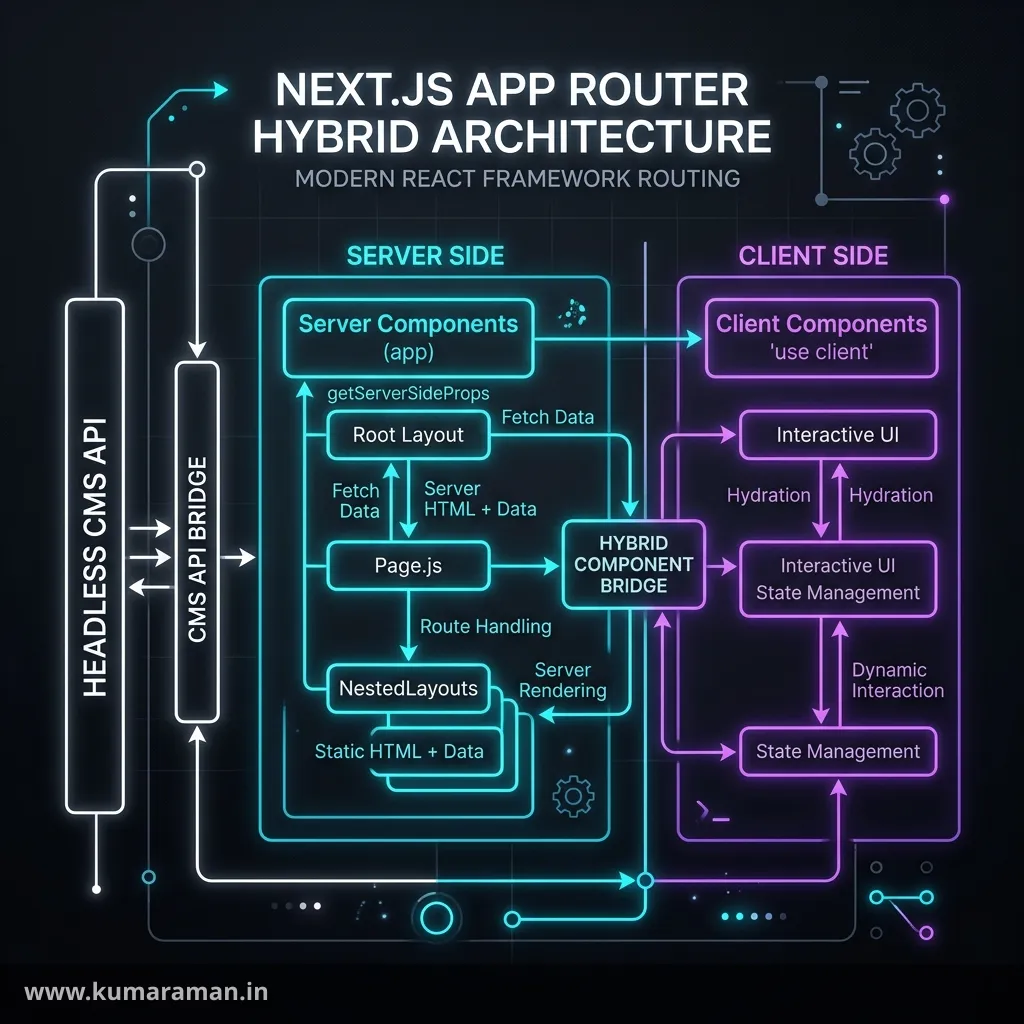
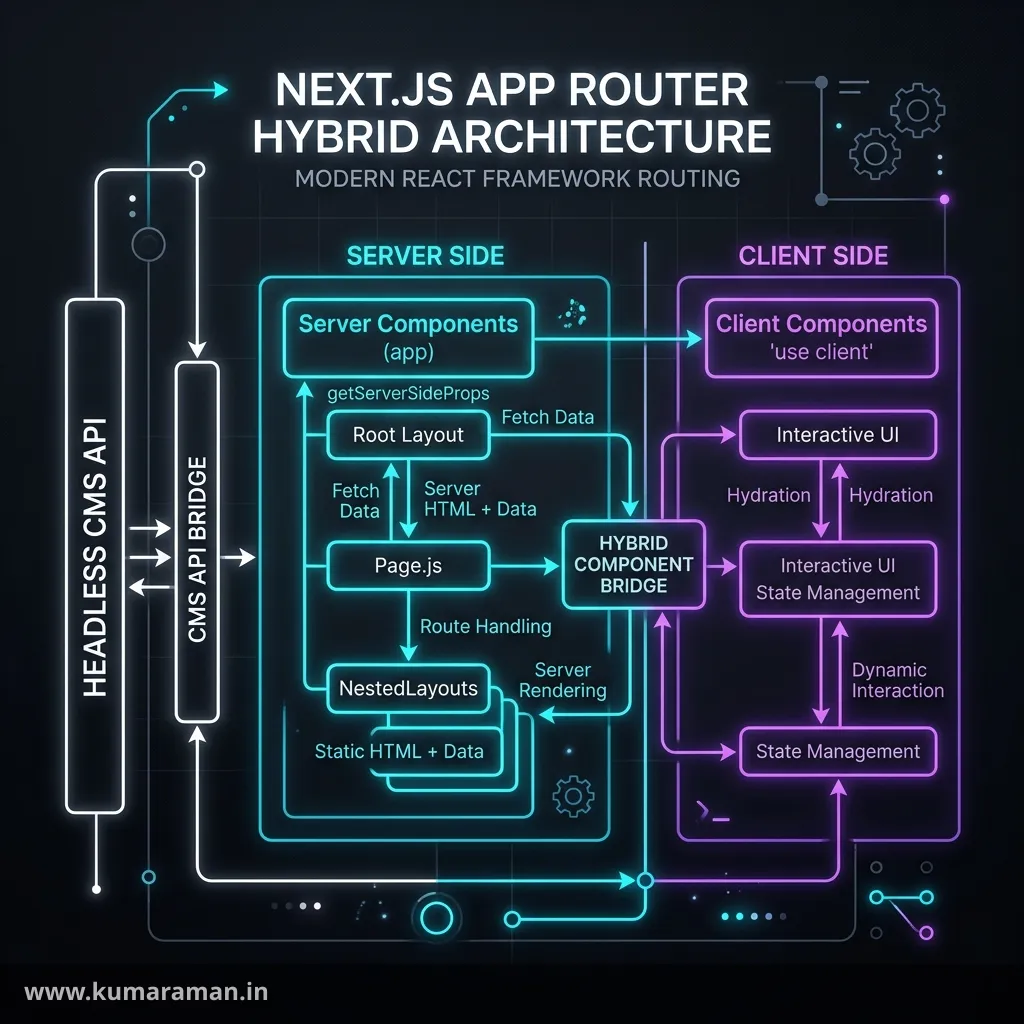
If you've spent years in AEM, you already understand most of what Next.js does — you just know it under different names. A request comes in, something resolves it to code, that code renders HTML on the server, a cache sits in front of it, and a publish event has to punch through that cache. Sling, HTL, clientlibs, and the Dispatcher solve that in AEM; the App Router, React Server Components, and the Next.js cache solve it in Next.js.
This guide teaches the Next.js 16 App Router through that mapping: routing vs Sling resolution, layouts vs editable templates, Server Components vs HTL, caching vs the Dispatcher, route handlers vs Sling servlets, proxy.ts vs filters, metadata vs page properties, and Vercel vs Cloud Manager. Then it gets practical: a headless AEM front end with GraphQL persisted queries, publish-driven revalidation, draft mode for authors, AEM Assets images, and the Universal Editor. I use this site (built on Next.js 16) as a real example and call out everything version-specific.
If you need the AEM side refreshed first, read the Sling guide, the Dispatcher guide, and the Content Fragments guide. For the wider integration picture, see AEM APIs and Integrations and AEM Frontend Integration.
The mental model: Sling vs the App Router
In AEM, Sling decomposes /content/site/en/products.detail.html/shoes into a resource path, selectors, an extension, and a suffix, finds the resource in the JCR, and picks a script by its sling:resourceType, selectors, extension, and method. Content and code are separate.
The Next.js App Router collapses that into one idea: the folder structure under app/ is the URL structure. There's no repository lookup and no resource type — a folder is a route segment, and a special file inside it (page.tsx, route.ts, layout.tsx) is the code that runs. Content comes from wherever your code fetches it: a database, a CMS, local MDX files, or AEM.
Note: Everything below targets Next.js 16 (current docs are 16.3.x as of September 2026) with React 19.2. Next.js 16 requires Node.js 20.9+ and TypeScript 5.1+.
Routing: folders instead of resource resolution
Static and dynamic segments
A folder becomes a URL segment. A folder in square brackets is a dynamic segment — the closest thing to a Sling suffix or a path-driven lookup:
app/
  layout.tsx                 → root layout (html/body shell)
  page.tsx                   → /
  blog/
    page.tsx                 → /blog
    [slug]/
      page.tsx               → /blog/anything
  docs/
    [...path]/page.tsx       → /docs/a/b/c   (catch-all)
  shop/
    [[...filters]]/page.tsx  → /shop and /shop/x/y (optional catch-all)
  rss.xml/
    route.ts                 → /rss.xml (a non-HTML endpoint)
In Next.js 15 and 16, params and searchParams are Promises — synchronous access was removed in 16, so you must await them:
// app/blog/[slug]/page.tsx
import { notFound } from "next/navigation";
import { getPostBySlug, getAllSlugs } from "@/lib/posts";

export async function generateStaticParams() {
  const slugs = await getAllSlugs();
  return slugs.map((slug) => ({ slug }));
}

export default async function PostPage({
  params,
}: {
  params: Promise<{ slug: string }>;
}) {
  const { slug } = await params;
  const post = await getPostBySlug(slug);
  if (!post) notFound();

  return (
    <article>
      <h1>{post.title}</h1>
      <p>{post.description}</p>
    </article>
  );
}
generateStaticParams tells Next.js which values to prerender at build time — think of it as warming the Dispatcher cache for known URLs before anyone requests them. This site does exactly that in app/(site)/blog/[slug]/page.tsx: every MDX file in content/blog/ becomes a prerendered page.
What about selectors and suffixes?
There's no selector concept. Where AEM uses page.mobile.html or page.model.json, Next.js uses one of:
- A separate route — e.g.
app/api/products/[id]/route.tsfor JSON instead of a.model.jsonselector. - A dynamic or catch-all segment — the equivalent of reading
suffixin a Sling Model. searchParams— for filters and variants that shouldn't create new paths.- A folder with an extension in its name — this site serves its feed from
app/rss.xml/route.ts, the same way you'd register a servlet for a.xmlextension.
Route groups: organizing without changing URLs
A folder in parentheses — (site) — is a route group. It doesn't appear in the URL; it shares a layout across a set of routes, like pages sharing one editable template. On this site, app/(site)/ holds the public pages with the navbar and footer layout, while app/portal/ has separate (app) and (auth) groups with different chrome. The URL /blog is served by app/(site)/blog/page.tsx.
Layouts vs page templates
In AEM, an editable template defines the structure and initial content of pages created from it. In the App Router:
layout.tsxwraps every page below it. Layouts nest: the root layout wraps the(site)layout, which wraps the blog layout, which wraps a post.- Layouts persist across client navigations — when you move between two pages under the same layout, the layout doesn't re-render or lose state.
- The root layout must render
htmlandbody. On this site,app/layout.tsxis only the HTML, fonts, and metadata shell; the visible chrome lives inapp/(site)/layout.tsx.
A few more file conventions map cleanly to AEM ideas:
| File | Purpose | AEM analogy |
|---|---|---|
layout.tsx | Shared, persistent UI | Editable template structure |
page.tsx | The routable page | Page component + content |
loading.tsx | Instant loading UI (a Suspense boundary) | No direct equivalent |
error.tsx | Error boundary for the segment | Custom error handler scripts |
not-found.tsx | 404 UI | /apps/sling/servlet/errorhandler/404.html |
route.ts | HTTP endpoint | Sling servlet |
Rendering: Server Components vs HTL and clientlibs
Server Components are HTL with data access
In the App Router, every component is a React Server Component by default. It runs only on the server, can be async, can read secrets and call databases, and sends no JavaScript for itself to the browser. That's the HTL model: markup rendered on the server with direct access to back-end data (via Sling Models), and nothing shipped to the client unless you add a clientlib.
// A Server Component: async, runs on the server only
export default async function ProductList() {
  const res = await fetch(`${process.env.AEM_PUBLISH_HOST}/graphql/execute.json/site/products`);
  const { data } = await res.json();

  return (
    <ul>
      {data.productList.items.map((p: { _path: string; name: string }) => (
        <li key={p._path}>{p.name}</li>
      ))}
    </ul>
  );
}
Client Components are your clientlibs
When you need state, effects, event handlers, or browser APIs, you add the "use client" directive at the top of a file. That file — and everything it imports — becomes part of the client bundle. It still renders to HTML on the server for the first load, then hydrates in the browser.
"use client";

import { useState } from "react";

export function AddToCartButton({ sku }: { sku: string }) {
  const [added, setAdded] = useState(false);
  return (
    <button onClick={() => setAdded(true)} data-sku={sku}>
      {added ? "Added" : "Add to cart"}
    </button>
  );
}
Keep pages and data fetching in Server Components and push "use client" down to the smallest interactive leaves — the same discipline as keeping clientlibs small.
Important: Props passed from a Server Component to a Client Component must be serializable (plain objects, arrays, strings, numbers, dates — not class instances or arbitrary functions). And anything a Client Component imports ends up in the browser, so never import a module that reads secrets into a
"use client"file. Theserver-onlypackage makes that mistake a build error.
Caching and revalidation: the Dispatcher inside your app
AEM developers have a head start here: you already think in stat files, TTLs, and flushes. Next.js has the same ideas, but the model changed significantly in version 16.
Two caching models in Next.js 16
Next.js 16 ships two caching models, and the docs are split accordingly:
- The previous model (default) — without any config flag.
fetchis not cached by default (a change made in Next.js 15). You opt in per request withcache: "force-cache"ornext: { revalidate, tags }, cache non-fetchwork withunstable_cache, and control routes with segment config likeexport const revalidate = 3600orexport const dynamic = "force-static". - Cache Components (opt-in) — enabled with
cacheComponents: trueinnext.config.ts. Caching becomes explicit with the"use cache"directive pluscacheLifeandcacheTag. Pages render a static shell (Partial Prerendering) with dynamic parts streaming in behindSuspense. This replaces the oldexperimental.pprandexperimental.dynamicIOflags, which were removed in 16.
Note: The Next.js 16 docs state that
unstable_cache"has been replaced byuse cache" and recommend opting into Cache Components.unstable_cachestill works in the previous model, and the docs point out one practical difference:use cacheentries are keyed by the build ID and don't survive a new deploy, whileunstable_cacheand thefetchcache persist across deployments.
This site currently uses the previous model: the blog pages are prerendered with generateStaticParams, the homepage is force-static, app/sitemap.ts sets revalidate = 3600, and the comments API wraps its Supabase read in unstable_cache with a per-post tag that gets revalidated when a comment is approved.
Mapping to the Dispatcher
| Dispatcher / AEM | Next.js |
|---|---|
| Page cached on first request, served from disk after | Static rendering (prerender at build) or ISR (cache on first request) |
/statfileslevel + flush agent invalidation | revalidatePath(path) |
| Invalidate everything related to a piece of content | revalidateTag(tag, profile) on tagged data |
TTL via Cache-Control / /enableTTL | next: { revalidate: n }, export const revalidate, or cacheLife |
Uncacheable request (query string, cookie, no-cache rule) | Dynamic rendering: cookies(), headers(), searchParams, no-store |
| Flush a single path from a replication agent | Route handler that calls revalidatePath / revalidateTag |
| CDN in front of Dispatcher | Vercel's edge network in front of your functions |
The deepest similarity is invalidation semantics. A Dispatcher flush doesn't re-render anything by itself; it marks cached files as stale, and the next request triggers a fresh render. Next.js works the same way: the revalidateTag docs note that "a revalidation is triggered by a request, not by the revalidateTag call."
Tagging data (previous model)
// lib/aem.ts — previous model: tag the fetch
export async function getArticle(slug: string) {
  const vars = encodeURIComponent(`;slug=${slug}`);
  const res = await fetch(`${process.env.AEM_PUBLISH_HOST}/graphql/execute.json/site/article-by-slug${vars}`, {
    next: { tags: ["articles", `article:${slug}`], revalidate: 3600 },
  });
  if (!res.ok) throw new Error(`AEM responded ${res.status}`);
  return res.json();
}
Tagging data (Cache Components)
// lib/aem.ts — with cacheComponents: true in next.config.ts
import { cacheLife, cacheTag } from "next/cache";

export async function getArticle(slug: string) {
  "use cache";
  cacheLife("hours");
  cacheTag("articles", `article:${slug}`);

  const vars = encodeURIComponent(`;slug=${slug}`);
  const res = await fetch(`${process.env.AEM_PUBLISH_HOST}/graphql/execute.json/site/article-by-slug${vars}`);
  if (!res.ok) throw new Error(`AEM responded ${res.status}`);
  return res.json();
}
Arguments (here, slug) automatically become part of the cache key. You can't call cookies() or headers() inside a "use cache" scope — read them outside and pass the values in as arguments.
Invalidating: revalidateTag, updateTag, revalidatePath
The invalidation API changed in Next.js 16:
revalidateTag(tag, profile)now takes a second argument."max"(recommended) gives stale-while-revalidate: the next visitor gets the cached copy while a fresh one renders in the background. The single-argument form is deprecated and behaves like{ expire: 0 }.revalidateTag(tag, { expire: 0 })expires immediately — the next request blocks on a fresh render. The docs recommend this form for webhooks, whereupdateTagisn't available.updateTag(tag)is new in 16 and Server Actions only: it expires the cache and reads fresh data in the same request (read-your-writes).refresh()is new in 16, Server Actions only, and refreshes uncached data without touching the cache.revalidatePath(path)invalidates a specific route — the closest thing to flushing one page.
Neither revalidateTag nor revalidatePath can run in Client Components or in proxy.ts; call them from route handlers or Server Actions. This site's comments API uses revalidateTag(commentsTag(slug), "max") so an approved comment shows up without waiting for the 60-second fallback.
Tip: Choose the profile the way you'd choose between a Dispatcher flush and a TTL. For marketing pages where a few seconds of staleness is fine, use
"max". For a publish event where authors expect to see their change on the next reload, use{ expire: 0 }from the webhook.
Data fetching and mutations
fetch in Server Components ≈ Sling Models
Where a Sling Model exposes data to HTL, a Server Component simply awaits its data. Identical fetch calls in one render are memoized; for non-fetch clients, wrap the call in React's cache() to deduplicate within a render.
Route handlers ≈ Sling servlets
A route.ts file exports functions named after HTTP methods — the equivalent of a servlet registered with sling.servlet.methods:
// app/api/stores/route.ts
import type { NextRequest } from "next/server";

export async function GET(request: NextRequest) {
  const city = request.nextUrl.searchParams.get("city") ?? "";
  const stores = await findStores(city);
  return Response.json({ stores });
}

async function findStores(city: string) {
  // call AEM, a database, or another API
  return [{ city, name: "Main Street" }];
}
Route handlers use the Web Request and Response APIs, and GET handlers are not cached by default (since Next.js 15). This site's app/api/ has real ones: contact, subscribe, chat, the tools endpoints, and blog comments.
Note: A route handler and a
page.tsxcan't live in the same segment folder. Put APIs underapp/api/(or another dedicated segment), the same way you'd keep servlets on their own paths.
Server Actions ≈ POST servlets behind a form
A Server Action (a Server Function called from a form or event handler) is an async function marked with "use server". Next.js wires it to a POST request for you — no endpoint URL to design, no fetch call to write:
// app/newsletter/actions.ts
"use server";

import { revalidateTag } from "next/cache";

export async function subscribe(formData: FormData): Promise<void> {
  const email = String(formData.get("email") ?? "").trim();
  if (!/^[^\s@]+@[^\s@]+\.[^\s@]+$/.test(email)) return; // validate server-side

  await saveSubscriber(email);
  revalidateTag("subscriber-count", "max");
}

async function saveSubscriber(email: string) {
  // write to your data store
  console.log("subscribed", email);
}
// app/newsletter/page.tsx
import { subscribe } from "./actions";
export default function NewsletterPage() {
return (
<form action={subscribe}>
<input name="email" type="email" required />
<button type="submit">Subscribe</button>
</form>
);
}Important: Treat every Server Action like a public POST servlet. Anyone can call it, and the Next.js docs warn that a
proxy.tsmatcher that excludes a path also skips the Server Actions on that path — so validate input and check authentication inside the action, exactly as you would in a servlet'sdoPost.
proxy.ts: Sling filters and Dispatcher rules
Next.js 16 renamed middleware.ts to proxy.ts, and the exported function from middleware to proxy. Proxy runs before a route renders and can redirect, rewrite, set headers and cookies, or answer the request directly. It now defaults to the Node.js runtime; the old middleware.ts file still works for Edge runtime use cases but is deprecated. A codemod handles the rename: npx @next/codemod@canary middleware-to-proxy .
That maps to two AEM layers: a Sling filter (code that runs before servlet/script resolution) and the Dispatcher's rewrite and filter rules (URL decisions before a request reaches publish).
// proxy.ts (project root, next to app/)
import { NextResponse, type NextRequest } from "next/server";

export function proxy(request: NextRequest) {
  const { pathname } = request.nextUrl;

  // Legacy AEM URLs → new routes (like a mod_rewrite rule)
  if (pathname.startsWith("/content/mysite/en/")) {
    const target = pathname.replace("/content/mysite/en", "").replace(/\.html$/, "");
    return NextResponse.redirect(new URL(target || "/", request.url), 301);
  }

  // Gate a section (like a filter deny + login redirect)
  if (pathname.startsWith("/members") && !request.cookies.has("session")) {
    return NextResponse.redirect(new URL("/login", request.url));
  }

  return NextResponse.next();
}

export const config = {
  matcher: ["/((?!_next/static|_next/image|favicon.ico).*)"],
};
This site's proxy.ts is a good real-world example: it lets static asset requests straight through (so the image optimizer never gets redirected), refreshes the Supabase session on /portal routes, and gates non-local deployments behind a signed session cookie when a stage-auth flag is on.
The execution order is the Dispatcher pipeline in different clothes: headers from next.config, then redirects from next.config, then Proxy, then beforeFiles rewrites, then filesystem routes, then afterFiles rewrites, then dynamic routes, then fallback rewrites.
Tip: Static redirect maps belong in
next.config.tsredirects(), not in Proxy — the same advice as putting redirect maps in Dispatcher rewrite rules instead of AEM. This site redirects the bare/servicespath that way. Use Proxy only when the decision needs request data like cookies or headers. You can audit the results with the Redirect Checker.
Metadata and SEO: page properties, in code
In AEM, authors fill in page properties — title, description, robots, canonical, social images — and your page component renders them into the head. In the App Router, you export either a static metadata object or an async generateMetadata function from a page.tsx or layout.tsx, and Next.js renders the tags:
// app/blog/[slug]/page.tsx
import type { Metadata } from "next";

export async function generateMetadata({
  params,
}: {
  params: Promise<{ slug: string }>;
}): Promise<Metadata> {
  const { slug } = await params;
  const post = await getPostBySlug(slug);
  if (!post) return {};

  return {
    title: post.title,
    description: post.description,
    alternates: { canonical: `https://www.example.com/blog/${slug}` },
    openGraph: { title: post.title, description: post.description, type: "article" },
  };
}
Metadata from layouts merges down into pages, much like inherited page properties. The file conventions app/sitemap.ts, app/robots.ts, and app/manifest.ts replace the sitemap servlets and robots.txt pages you'd build in AEM — this site uses all three. For the SEO strategy itself, see the AEM SEO guide, and check your output with the Meta Tag Preview and Robots & Sitemap tools.
Images and fonts
next/image ≈ Adaptive Image Servlet + renditions
next/image generates a responsive srcset, lazy-loads by default, serves WebP/AVIF, and reserves space to prevent layout shift — the job the Core Components Image does with the Adaptive Image Servlet and web-optimized delivery. Remote images must be allow-listed in next.config.ts:
// next.config.ts
import type { NextConfig } from "next";

const nextConfig: NextConfig = {
  images: {
    remotePatterns: [
      { protocol: "https", hostname: "publish-p12345-e67890.adobeaemcloud.com", pathname: "/content/dam/**" },
    ],
  },
};

export default nextConfig;
Next.js 16 changed image defaults — minimumCacheTTL is now 4 hours (was 60 seconds) and qualities defaults to [75] — and deprecated the priority prop in favor of preload and images.domains in favor of remotePatterns.
next/font ≈ font clientlibs, done right
next/font/google and next/font/local download fonts at build time and self-host them, so there's no runtime request to Google and no layout shift. This site's root layout loads three Google fonts that way and exposes them as CSS variables for Tailwind.
Environment variables vs OSGi configs
On AEM as a Cloud Service, you put environment-specific values in OSGi configs with $[env:NAME] placeholders for plain values and $[secret:NAME] for secrets, then set them per environment in Cloud Manager. Next.js has a simpler rule with one sharp edge:
- Plain variables (e.g.
AEM_PUBLISH_HOST,AEM_TOKEN) are available only on the server. NEXT_PUBLIC_variables are inlined into the browser bundle at build time. After the build, changing them does nothing until you rebuild..env.localoverrides.env;.env.productionand.env.developmentapply byNODE_ENV; realprocess.envvalues win over all files.
| AEM Cloud Service | Next.js / Vercel |
|---|---|
$[secret:AEM_TOKEN] in an OSGi config | AEM_TOKEN (no prefix), read on the server |
$[env:ANALYTICS_ID] | NEXT_PUBLIC_ANALYTICS_ID if the browser needs it |
| Per-environment values in Cloud Manager | Per-environment values in Vercel (Production, Preview, Development) |
Run modes (config.author, config.publish) | VERCEL_ENV, NODE_ENV, or separate env values |
Important: Never put a token in a
NEXT_PUBLIC_variable. It is literally written into your JavaScript files. That's the equivalent of putting a service user password in a clientlib.
Deployment: Vercel vs Cloud Manager
Cloud Manager pipelines build, run quality gates, deploy to stage, and promote to production. Vercel is Git-driven and lighter: every push to a non-production branch or PR creates a Preview deployment with its own URL, merging to the production branch (usually main) creates a Production deployment, each environment has its own variables (Pro and Enterprise can add custom environments such as staging), and you can stage a production build and promote it without rebuilding.
This site deploys that way, and its root layout only turns on production analytics when VERCEL_ENV is production — a run-mode check in everything but name. For the AEM side of pipelines, see the Cloud Service guide.
Building a headless AEM front end with Next.js
The architecture: AEM as a Cloud Service holds Content Fragments, exposes them through GraphQL persisted queries on publish, and a Next.js app on Vercel renders the site, caches aggressively, and revalidates when content is published.
Step 1: Persisted queries on AEM
Adobe recommends persisted queries for publish because they're requested with GET, so the Dispatcher and CDN can cache them. You create one with a PUT to /graphql/persist.json/<config>/<name>, and execute it at /graphql/execute.json/<config>/<name>:
# Persisted as site/article-by-slug
query ArticleBySlug($slug: String!) {
  articleList(filter: { slug: { _expressions: [{ value: $slug }] } }) {
    items {
      _path
      title
      slug
      body { html }
      heroImage {
        ... on ImageRef {
          _path
          _dynamicUrl
          width
          height
        }
      }
    }
  }
}
Variables are appended with semicolons (;slug=value) and must be URL-encoded. By default, persisted query responses on publish are sent with max-age 60 seconds and s-maxage 7200 seconds, plus stale-while-revalidate and stale-if-error of 86400 — so remember there's an AEM/CDN cache behind your Next.js cache. You can override those headers per query. The CF Model and CF JSON Schema tools help design the model side.
Step 2: A typed data layer
You can use Adobe's JavaScript SDK, @adobe/aem-headless-client-js (currently v4.0.0; it exposes runPersistedQuery(path, variables, options)), or call the endpoint with plain fetch. I prefer plain fetch in a Next.js app because the Next.js cache options stay explicit and visible:
// lib/aem.ts
import "server-only";

const HOST = process.env.AEM_PUBLISH_HOST!; // e.g. https://publish-p12345-e67890.adobeaemcloud.com

type Article = {
  _path: string;
  title: string;
  slug: string;
  body: { html: string };
  heroImage?: { _path: string; _dynamicUrl?: string; width?: number; height?: number };
};

async function runPersistedQuery<T>(
  query: string,
  variables: Record<string, string>,
  tags: string[],
): Promise<T> {
  // Same encoding approach as the Adobe SDK: encode the whole ";key=value" string
  const vars = Object.entries(variables)
    .map(([k, v]) => encodeURIComponent(`;${k}=${v}`))
    .join("");

  const res = await fetch(`${HOST}/graphql/execute.json/${query}${vars}`, {
    headers: { Accept: "application/json" },
    next: { tags, revalidate: 3600 }, // previous model: cache + tag
  });
  if (!res.ok) throw new Error(`AEM GraphQL ${res.status} for ${query}`);

  const json = (await res.json()) as { data: T; errors?: unknown[] };
  if (json.errors?.length) throw new Error(`AEM GraphQL errors for ${query}`);
  return json.data;
}

export async function getArticle(slug: string): Promise<Article | null> {
  const data = await runPersistedQuery<{ articleList: { items: Article[] } }>(
    "site/article-by-slug",
    { slug },
    ["aem", "articles", `article:${slug}`],
  );
  return data.articleList.items[0] ?? null;
}
The page is then ordinary App Router code:
// app/articles/[slug]/page.tsx
import { notFound } from "next/navigation";
import { getArticle } from "@/lib/aem";

export default async function ArticlePage({
  params,
}: {
  params: Promise<{ slug: string }>;
}) {
  const { slug } = await params;
  const article = await getArticle(slug);
  if (!article) notFound();

  return (
    <article>
      <h1>{article.title}</h1>
      <div dangerouslySetInnerHTML={{ __html: article.body.html }} />
    </article>
  );
}
Note:
dangerouslySetInnerHTMLtrusts your authors' rich text with no XSS filtering, unlike HTL'scontext='html'. Sanitize the HTML on the server if authors aren't fully trusted.
Step 3: Revalidate on publish (the new flush agent)
On AEM, publishing triggers a Dispatcher flush. Your Next.js front end needs an equivalent. Two options:
- AEM Eventing (AEM as a Cloud Service only). Adobe I/O Events delivers Content Fragment events — created, modified, published, unpublished, deleted — as CloudEvents-style JSON to a webhook you register in the Adobe Developer Console. The payload includes the event
typeand the repository path indata.path. Check Adobe's event type list for the exact names you subscribe to. - Your own trigger — a workflow step or replication event handler on AEM that calls your endpoint with a shared secret. This works on AEM 6.5 and AMS as well.
Here's a route handler that serves as the flush endpoint. It answers Adobe I/O Events' challenge (a GET with a challenge query parameter that must be echoed back) and revalidates on POST:
// app/api/aem-events/route.ts
import type { NextRequest } from "next/server";
import { revalidateTag } from "next/cache";

// Adobe I/O Events verifies a new webhook with GET ?challenge=...
export async function GET(request: NextRequest) {
  const challenge = request.nextUrl.searchParams.get("challenge");
  if (!challenge) return new Response("Missing challenge", { status: 400 });
  return Response.json({ challenge });
}

export async function POST(request: NextRequest) {
  // Authenticate the caller. For Adobe I/O Events, verify the
  // x-adobe-digital-signature-* headers against Adobe's public keys;
  // for a custom trigger, compare a shared secret.
  if (request.headers.get("x-flush-secret") !== process.env.FLUSH_SECRET) {
    return new Response("Unauthorized", { status: 401 });
  }

  const event = (await request.json()) as { type?: string; data?: { path?: string } };
  const path = event.data?.path;

  // Map the fragment path to your tags, e.g. /content/dam/site/articles/my-post
  if (path?.includes("/articles/")) {
    const slug = path.split("/").pop();
    if (slug) revalidateTag(`article:${slug}`, { expire: 0 });
    revalidateTag("articles", "max");
  } else {
    revalidateTag("aem", "max");
  }

  return Response.json({ revalidated: true, type: event.type ?? null });
}
Important: Adobe I/O Events signs each payload with RSA-SHA256 and sends the signatures in
x-adobe-digital-signature-1andx-adobe-digital-signature-2, with the public key paths inx-adobe-public-key1-pathandx-adobe-public-key2-path. The shared-secret check above is a placeholder for a custom trigger. For I/O Events, implement signature verification as described in the Adobe I/O Events docs before trusting the payload. An unauthenticated revalidation endpoint is a cache-busting DoS vector, just like an open Dispatcher/invalidate.cache.
Mind the layering: if Next.js revalidates while AEM's CDN still serves the old persisted-query response (up to s-maxage), you re-cache stale content. Shorten that TTL or make sure publish purges the CDN first.
Step 4: Draft mode for authors
Authors need to see unpublished changes. Next.js draft mode sets a __prerender_bypass cookie; for requests carrying it, fetch skips the cache, "use cache" and unstable_cache re-execute without saving, and the page is served with Cache-Control: private, no-cache, no-store. Other visitors keep getting the cached page.
// app/api/draft/route.ts
import { draftMode } from "next/headers";
import { redirect } from "next/navigation";

const SLUG_RE = /^[a-z0-9-]+$/;

export async function GET(request: Request) {
  const { searchParams } = new URL(request.url);
  const secret = searchParams.get("secret");
  const slug = searchParams.get("slug");

  if (secret !== process.env.DRAFT_SECRET || !slug || !SLUG_RE.test(slug)) {
    return new Response("Invalid request", { status: 401 });
  }

  const draft = await draftMode();
  draft.enable();
  redirect(`/articles/${slug}`); // a path you build, never a raw URL from the query
}
The handler validates the slug's shape rather than looking it up, because a brand-new article doesn't exist on publish yet. AEM serves drafts from author, so branch your data layer on isEnabled and feed the result into runPersistedQuery:
import { draftMode } from "next/headers";

export async function aemBase() {
  const { isEnabled } = await draftMode();
  return isEnabled
    ? { host: process.env.AEM_AUTHOR_HOST!, auth: `Bearer ${process.env.AEM_AUTHOR_TOKEN}` }
    : { host: process.env.AEM_PUBLISH_HOST!, auth: undefined };
}
Step 5: Images from AEM Assets and Dynamic Media
For fragment images, the GraphQL ImageRef type exposes _path, _authorUrl, _publishUrl, _dynamicUrl ("the preferred URL to use for web-optimized DAM assets," per Adobe), and _dmS7Url for Dynamic Media. The _assetTransform argument requests a transformed rendition (width, format, quality, and more).
Two options with next/image:
- Let Next.js optimize — allow-list your publish host in
remotePatternsand pass the_publishUrl. Simple, but it duplicates work AEM can already do. - Let AEM optimize — use a custom loader that asks AEM for the right width. With Dynamic Media with OpenAPI (AEM as a Cloud Service), delivery URLs look like
https://delivery-pXXXX-eYYYY.adobeaemcloud.com/adobe/assets/{assetId}/as/{seoName}.{format}and accept modifiers such aswidthandquality. Only approved assets are delivered.
"use client";

import Image, { type ImageLoaderProps } from "next/image";

// Loader functions must be defined in a Client Component (functions aren't serializable)
function aemDeliveryLoader({ src, width, quality }: ImageLoaderProps) {
  const url = new URL(src);
  url.searchParams.set("width", String(width));
  url.searchParams.set("quality", String(quality ?? 75));
  return url.toString();
}

export function AemImage(props: { src: string; alt: string; width: number; height: number }) {
  return <Image loader={aemDeliveryLoader} sizes="(max-width: 768px) 100vw, 768px" {...props} />;
}
For a site-wide setup, images: { loader: "custom", loaderFile: "./lib/aem-image-loader.ts" } in next.config.ts applies the loader to every next/image. For the DAM side, see the Assets guide.
Step 6: The Universal Editor with a Next.js front end
Adobe documents the Universal Editor as compatible with "virtually any architecture (SSR, CSR), web framework (Next.js, React, Astro, etc.)" and hosting model — "bring your own app." It's supported on AEM as a Cloud Service (release 2023.8.13099 or higher) and on AEM 6.5 LTS and 6.5. To make your app editable, you instrument it:
- Load the CORS library:
https://universal-editor-service.adobe.io/cors.js. - Add a connection meta tag,
urn:adobe:aue:system:aemconnection, whose content isaem:followed by your author URL. - Add
data-aue-*attributes to editable elements:data-aue-resource(a URN such asurn:aemconnection:/content/dam/.../jcr:content/data/masterfor a fragment's master variation),data-aue-type(text,richtext,media,component,container, …),data-aue-prop(the field name), anddata-aue-label.
In the App Router, the tags go in the root layout. Gate them so only the deployment authors edit (one that reads from author) loads the editor script:
// app/layout.tsx (excerpt)
import Script from "next/script";

const editable = process.env.ENABLE_UNIVERSAL_EDITOR === "true"; // set only on the authoring deployment

export default function RootLayout({ children }: { children: React.ReactNode }) {
  return (
    <html lang="en">
      <head>
        {editable && (
          <meta
            name="urn:adobe:aue:system:aemconnection"
            content={`aem:${process.env.AEM_AUTHOR_HOST}`}
          />
        )}
      </head>
      <body>
        {children}
        {editable && (
          <Script src="https://universal-editor-service.adobe.io/cors.js" strategy="afterInteractive" />
        )}
      </body>
    </html>
  );
}
// components/ArticleHeader.tsx — instrumented for the Universal Editor
export function ArticleHeader({ path, title }: { path: string; title: string }) {
return (
<header
data-aue-resource={`urn:aemconnection:${path}/jcr:content/data/master`}
data-aue-type="component"
data-aue-label="Article"
>
<h1 data-aue-prop="title" data-aue-type="text">{title}</h1>
</header>
);
}Note: Adobe's official walkthrough instruments a React app (not specifically Next.js) and fetches fragments through the Content Fragment Delivery OpenAPI (
/adobe/contentFragments) rather than GraphQL — the instrumentation is the same either way. The editor loads your app inside its own UI, so check that yourX-Frame-Optionsand CSPframe-ancestorsheaders allow it on the authoring deployment; the Security Headers tool shows what you send.
Cheat sheet
| AEM concept | Next.js App Router equivalent |
|---|---|
| Sling resource resolution | Folders under app/ = URL segments |
| Selectors / suffix | Dynamic [slug], catch-all [...path], searchParams, separate routes |
| Editable template structure | Nested layout.tsx |
| Pages sharing a template | Route group (name) with its own layout |
| HTL + Sling Model | Async Server Component that fetches its own data |
| Clientlibs | "use client" components (hydrated in the browser) |
| Sling servlet (GET/POST) | route.ts exporting GET / POST |
| POST servlet behind a form | Server Action ("use server") |
| Sling filter / Dispatcher rewrite | proxy.ts (renamed from middleware.ts in 16) |
| Dispatcher static cache | Prerendering, ISR, "use cache" (Cache Components) |
| Dispatcher TTL | next.revalidate, export const revalidate, cacheLife |
| Flush a path | revalidatePath(path) |
| Invalidate related content | revalidateTag(tag, "max") or { expire: 0 } |
| Author preview | draftMode() + preview route handler |
| Page properties (title, SEO) | metadata / generateMetadata |
| Sitemap / robots servlets | app/sitemap.ts, app/robots.ts |
| Adaptive Image Servlet | next/image (+ custom loader for AEM delivery) |
OSGi $[env:] / $[secret:] | Server env vars / NEXT_PUBLIC_ (build-time, public) |
| Run modes | VERCEL_ENV, NODE_ENV, per-environment values |
| Cloud Manager pipeline | Vercel Git deployments (Preview / Production) |
| Error handler scripts | error.tsx, not-found.tsx, global-error.tsx |
Best practices
- ✅ Keep data fetching in Server Components and push
"use client"down to small interactive leaves. - ✅ Decide up front whether you're on the previous caching model or Cache Components, and don't mix documentation from the two.
- ✅ Tag every cached AEM read with both a broad tag (
articles) and a specific one (article:slug), so publish events can invalidate precisely. - ✅ Always pass the second argument to
revalidateTagin Next.js 16 —"max"for stale-while-revalidate,{ expire: 0 }when the change must show on the next request. - ✅ Use GET persisted queries on AEM publish so the Dispatcher and CDN can cache them, and account for their CDN TTL when you revalidate.
- ✅ Authenticate webhooks, draft-mode entry points, and Server Actions inside the handler — never rely on
proxy.tsalone. - ✅ Keep AEM tokens in server-only env vars and import data modules with
server-only. - ✅
await params,searchParams,cookies(),headers(), anddraftMode()— synchronous access is gone in 16.
Do's and Don'ts
Do ✅
- Use
generateStaticParamsto prerender known content, like warming the Dispatcher cache. - Use route groups to give different parts of the site different layouts without changing URLs.
- Use draft mode (and author credentials) only for preview requests, with a visible preview banner.
- Load the Universal Editor script and connection meta tag only on the authoring deployment.
- Run
npx @next/codemod@canary upgrade latestwhen moving from 15 to 16, then check the upgrade guide for anything the codemod can't migrate.
Don't ❌
- Don't expect
fetchto be cached by default — it hasn't been since Next.js 15. - Don't call the single-argument
revalidateTag(tag)in new code; it's deprecated in 16. - Don't put secrets in
NEXT_PUBLIC_variables — they're inlined into the browser bundle at build time. - Don't leave a revalidation or draft-mode endpoint unauthenticated.
- Don't redirect to a raw
slugquery parameter from your draft handler — that's an open redirect. - Don't read
cookies()orheaders()inside"use cache"; pass the values in as arguments. - Don't start new work on
middleware.ts— it's deprecated in favor ofproxy.ts.
Wrapping up
The App Router is far less exotic once you map it to AEM: folders are resource resolution, layouts are templates, Server Components are HTL with built-in data access, Client Components are clientlibs, route handlers are servlets, proxy.ts is your filter and rewrite layer, and the Next.js cache plus revalidateTag is a Dispatcher with a programmable flush. The real traps are version-specific — async params, uncached fetch, the two-argument revalidateTag, the proxy.ts rename, and the choice between the previous caching model and Cache Components — so pin your mental model to Next.js 16 and the current docs.
Continue with the Sling guide to sharpen the routing analogy, the Dispatcher guide for the caching side, the Content Fragments guide for modeling headless content, the Edge Delivery Services guide for Adobe's own alternative front-end stack, and the Web Security Headers guide before you expose your Next.js app to the Universal Editor. If you're planning your learning path, the AEM Developer Roadmap shows where headless and Next.js fit.
Discussion
Loading discussion…
Try a related tool
Subscribe to the Newsletter
Get the latest articles, tutorials, and tech insights delivered straight to your inbox. No spam, unsubscribe anytime.