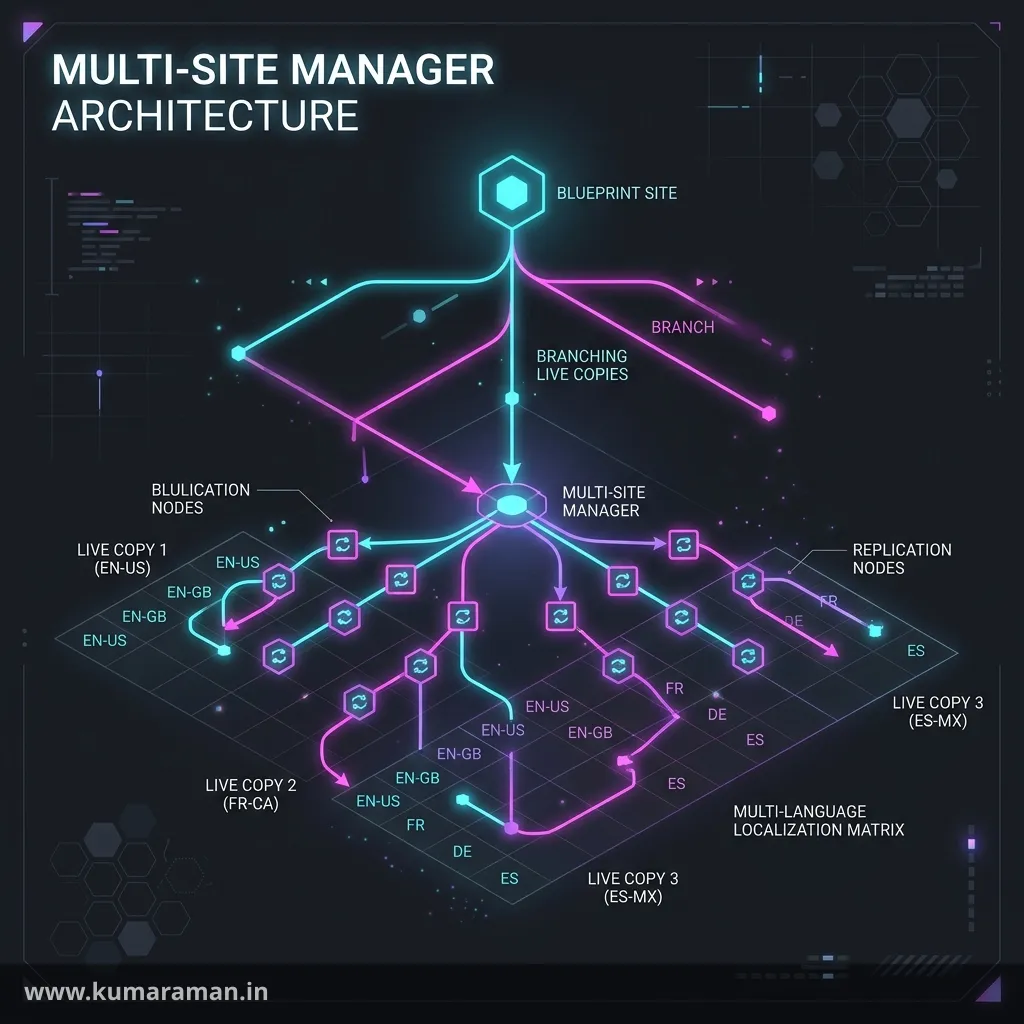
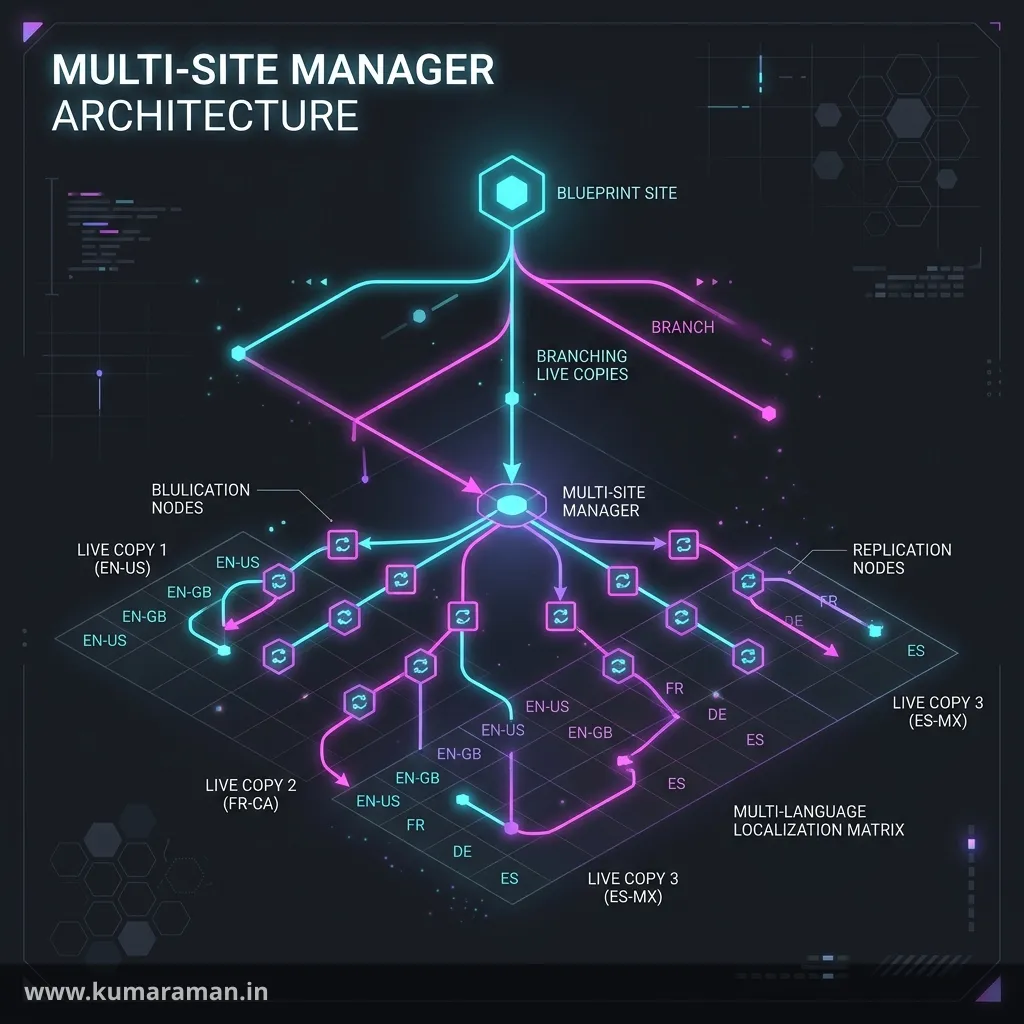
Almost every serious AEM implementation eventually becomes a multi-site implementation. A brand launches in the US, then Canada, then the UK, then Germany and Switzerland; or a group runs five brands that share 70% of their pages. Copying pages by hand stops working on day two: every change to the "global" page has to be re-applied in twenty places, and nobody knows which country is out of date. Multi-Site Manager (MSM) solves the reuse half of that problem, and the Translation Integration Framework solves the language half.
This guide covers both from an engineer's point of view: blueprints and live copies, how rollout configurations decide what gets overwritten, how inheritance is stored in the JCR, cancelling and detaching safely, custom LiveActions and programmatic rollouts, and how language copies, translation projects, and i18n dictionaries fit together. Where AEM as a Cloud Service (AEMaaCS) differs from AEM 6.5 / 6.5 LTS, it's called out explicitly.
It builds on the JCR & Oak guide (nodes, mixins, and properties), the OSGi guide (the configs you'll deploy), and the Workflows guide (translation runs on workflows, and rollouts can start them). If you're shipping to AEMaaCS, keep the Cloud Service guide handy for the "everything under /apps comes from Git" rule, which matters a lot here.
Why MSM exists
MSM lets you author content once in a source tree and reuse it in any number of target trees while keeping a live relationship between them. Change the source, run a rollout, and every target picks up the change — except where a local author has deliberately broken inheritance.
Adobe's documented scenarios are global to local (one English master feeding US, Canadian, and UK sites), head office to branches (a corporate site feeding dealer or franchise sites), and multiple versions (a product-support branch reused per release). Multi-brand setups with a shared core site follow the same pattern.
Two verbs matter: a rollout pushes from the source (the blueprint) to its live copies, and synchronize pulls from the source into one live copy. And one thing MSM does not do is translate — it copies and synchronizes structure and content. Translation is a separate framework, covered later, that is usually combined with MSM.
Blueprints and blueprint configurations
Any page or branch can be the source of a live copy. A blueprint configuration adds three things on top:
- The Rollout command on source pages, so authors can push to all live copies.
- The Create → Site wizard, which lets authors pick which language branches and "chapters" (child pages) to include in a new country site.
- A default rollout configuration for live copies of that blueprint.
The default blueprint template assumes a specific structure: a site root, whose direct children are language branches, whose children are the chapters. If your source doesn't look like that, you need a different blueprint template.
Blueprint configurations live in the Blueprints console (Tools → Sites → Blueprints), and this is the first big Cloud Service difference:
Important: On AEMaaCS, blueprint configurations and custom rollout configurations are treated as immutable code. They must be deployed from Git through the Cloud Manager pipeline. The Blueprints console is only usable on your local SDK — create the config there, pull it into your content package, commit it. On 6.5 you can create and edit them at runtime.
Adobe's own AEMaaCS enablement material goes further and states that on Cloud Service any live copy source behaves as a blueprint, so rollout can be started from a source even without a blueprint configuration. The Experience League page for creating live copies still describes the older rule (Rollout only when the source is referenced by a blueprint config). Verify the behaviour on your program's current release before designing governance around it.
Live copies vs language copies vs launches
All three are copies of pages under /content, but they solve different problems:
| Live copy (MSM) | Language copy (Translation) | Launch | |
|---|---|---|---|
| Purpose | Reuse the same-language content across sites | Hold a translated version of a language master | Prepare a future version of existing pages |
| Relationship | Live relationship, rollout/synchronize | Tracked by language root + translation projects | Built on MSM; promoted back into the source |
| Location | Anywhere you choose (e.g. /content/site/ca/en) | Sibling language roots (e.g. /content/site/language-masters/fr) | /content/launches/... |
| How changes move | Rollout configurations | Translation jobs (human/machine/AI) | Promote Launch |
| Local edits | Protected only by cancelling inheritance | Updated translations land in a launch for review | Merged on promotion |
The key insight: launches and translation updates are themselves built on MSM. A launch is a live copy managed by the Launches feature, and it's promoted with the built-in Promote Launch rollout configuration (which includes the markLiveRelationship action). When a translation project updates an existing language copy, AEM puts the translated pages in a launch, so a reviewer can check them before promotion overwrites the language copy.
A typical global site structure
The pattern Adobe recommends (and uses in WKND) is language masters → country live copies:
/content/brand
    |- language-masters          ← authored + translated here, not published
    |     |- en                  ← the source language (authoring happens here)
    |     |- fr                  ← language copy, translated from en
    |     |- de                  ← language copy, translated from en
    |- us
    |     |- en                  ← live copy of language-masters/en
    |     |- es
    |- ca
    |     |- en                  ← live copy of language-masters/en
    |     |- fr                  ← live copy of language-masters/fr
    |- ch
          |- de                  ← live copy of language-masters/de
          |- fr                  ← live copy of language-masters/fr
The flow is: author in language-masters/en → translate into language-masters/fr and de (language copies) → roll out each language master to every country that speaks that language (live copies). Adobe's translation best practices describe exactly this: keep language masters as a layer of un-activated pages where translations are reviewed, then push them to country sites, and keep no more than three levels between top-level authoring and country sites.
Two structural rules are worth memorizing:
- Language roots must be named as locales. A language root's page name must be an ISO-639-1 code (
fr) or language-country (fr_CH,fr-ch). One grouping level is allowed (for examplelanguage-masters/europe/de); in that case the page name can be anything and AEM falls back to the page'scq:languageproperty. - Don't add content directly below a language root, or languages below the first level, by hand. Create Site makes the first two levels of a new site shallow live copies, so content added directly below the language root isn't carried over on rollout.
Rollout configurations and synchronization actions
A rollout configuration is a trigger plus an ordered list of synchronization actions. The trigger says when, the actions say what.
Triggers
| UI name | cq:trigger value | Fires when |
|---|---|---|
| On Rollout | rollout | Rollout on the blueprint, or Synchronize on the live copy |
| On Modification | modification | The source page is modified |
| On Activation | publish | The source page is published |
| On Deactivation | deactivate | The source page is unpublished |
In Java these map to RolloutManager.Trigger.ROLLOUT, MODIFICATION, PUBLICATION, and DEACTIVATION (there is also NEVER).
Built-in rollout configurations
These are the out-of-the-box configs on AEMaaCS (6.5 has the same six plus some legacy Commerce/DPS catalog configs):
| Name | Trigger | Actions |
|---|---|---|
| Standard rollout config | On Rollout | contentUpdate, contentCopy, contentDelete, referencesUpdate, productUpdate, orderChildren |
| Activate on Blueprint activation | On Activation | targetActivate |
| Deactivate on Blueprint deactivation | On Deactivation | targetDeactivate |
| Push on modify | On Modification | contentUpdate, contentCopy, contentDelete, referencesUpdate, orderChildren |
| Push on modify (shallow) | On Modification | contentUpdate, contentCopy, contentDelete, orderChildren |
| Promote Launch | On Rollout | contentUpdate, contentCopy, contentDelete, referencesUpdate, orderChildren, markLiveRelationship |
The Standard rollout config lives at /libs/msm/wcm/rolloutconfigs/default and is the system default.
Synchronization actions
| Action | What it does |
|---|---|
contentUpdate | Updates live copy content with source changes |
contentCopy | Copies source nodes that don't exist in the live copy |
contentDelete | Deletes live copy nodes that no longer exist in the source |
orderChildren | Orders child nodes to match the blueprint |
referencesUpdate | Rewrites paths pointing into the blueprint so they point into the live copy |
editProperties | Regex find-and-replace on properties, driven by an editMap property |
notify | Sends a page event that the page was rolled out |
workflow | Starts the workflow model in the target property with the live copy as payload |
targetVersion / targetActivate / targetDeactivate | Version / publish / unpublish the live copy — each must be the only action in its config |
mandatory* (3 variants) | Make live copy pages read-only for a group (target = group ID) |
PageMoveAction | Copies a moved page to its new location — must be the only action in its config |
referencesUpdate is the one people underestimate. It's what makes a link from /content/brand/language-masters/en/products inside a rolled-out page become /content/brand/ca/en/products in the Canadian site. References that point outside the blueprint aren't touched.
Tip: Because
targetActivatemust stand alone, you combine behaviours by assigning several rollout configs to a live copy — for example Standard rollout config (content) plus Activate on Blueprint activation (publishing).
Where the rollout config comes from
MSM resolves which configs apply in this order (highest priority first):
- The live copy page's properties (Live Copy tab, with Inherit Rollout Configuration From Parent cleared).
- The blueprint page's properties (Blueprint tab).
- The live copy's parent page properties.
- The system default — OSGi config
com.day.cq.wcm.msm.impl.LiveRelationshipManagerImpl, propertyliverelationshipmgr.relationsconfig.default(default/libs/msm/wcm/rolloutconfigs/default).
Creating a custom rollout configuration
Never edit the configs in /libs. Create your own under /apps/msm/<your-project>/rolloutconfigs: a node of type cq:RolloutConfig with jcr:title, optional jcr:description, and cq:trigger, whose children are cq:LiveSyncAction nodes named after actions. Child order is execution order. In ui.apps, that's /apps/msm/mysite/rolloutconfigs/rollout-regional-links/.content.xml:
<?xml version="1.0" encoding="UTF-8"?>
<jcr:root xmlns:jcr="http://www.jcp.org/jcr/1.0"
          xmlns:cq="http://www.day.com/jcr/cq/1.0"
    jcr:primaryType="cq:RolloutConfig"
    jcr:title="My Site - Rollout + Regional Links"
    jcr:description="Standard content sync plus regional link rewrite"
    cq:trigger="rollout">
    <contentUpdate jcr:primaryType="cq:LiveSyncAction"/>
    <contentCopy jcr:primaryType="cq:LiveSyncAction"/>
    <contentDelete jcr:primaryType="cq:LiveSyncAction"/>
    <referencesUpdate jcr:primaryType="cq:LiveSyncAction"/>
    <orderChildren jcr:primaryType="cq:LiveSyncAction"/>
    <regionalLinkRewrite jcr:primaryType="cq:LiveSyncAction"
        globalHost="https://www.example.com"/>
</jcr:root>
Extra properties on a cq:LiveSyncAction node (like globalHost above) are passed to your LiveActionFactory as configuration — that's how you parameterize a custom action. You'll still see older projects using a cq:Page with the actions under jcr:content; the product docs show the cq:RolloutConfig form.
Important: Make sure the intermediate folders you create under
/apps/msmuse the same node types as their/libs/msmcounterparts. A mismatch is the classic cause ofConstraintViolationException: No matching node definition foundwhen the package installs. On AEMaaCS this whole tree must ship from Git.
How inheritance is stored in the JCR
The UI shows chain-link icons; the repository shows mixins and properties. Knowing both is how you debug "why didn't this roll out?". The constants are all in com.day.cq.wcm.msm.api.MSMNameConstants.
| Where | What you'll find | Meaning |
|---|---|---|
Live copy root jcr:content | mixin cq:LiveSync | This page is the root of a live copy |
...its child cq:LiveSyncConfig | cq:master, cq:rolloutConfigs, cq:isDeep | Source path, active rollout configs, deep or shallow |
Every live copy page jcr:content | mixin cq:LiveRelationship | This page is under MSM control |
| Suspended page / cancelled component | mixin cq:LiveSyncCancelled (+ cq:isCancelledForChildren) | Inheritance stopped here (and for children if true) |
Page jcr:content with overridden fields | cq:propertyInheritanceCancelled (multi-value) | Names of page properties with a broken chain |
Live copy jcr:content | cq:lastRolledout, cq:lastRolledoutBy | Last rollout time and user |
A page without cq:LiveRelationship inside a live copy tree was either detached or created locally. That's also why you'll sometimes see pages renamed to <name>_msm_moved: if a rollout needs to create a live copy page and finds a same-named standalone page in the way, the default conflict handler (ResourceNameRolloutConflictHandler) moves the local page aside rather than losing it. Conflict handling is toggled by the Day CQ WCM Rollout Manager OSGi property rolloutmgr.conflicthandling.enabled.
Two debugging endpoints are worth bookmarking (author only):
# All live copies of a blueprint page, with advanced status
/content/brand/language-masters/en.blueprint.json?maxSize=500&advancedStatus=true&returnRelationships=true&msm%3Atrigger=ROLLOUT

# How a live copy page relates to its source
/content/brand/ca/en.msm.json
Turn the com.day.cq.wcm.msm logger to DEBUG while you call them. And because these are node types, you can query them — select * from [cq:LiveSync] returns every live copy root (see the Query Builder reference for building reports on top).
Cancelling, suspending, resetting, and detaching
Local teams need to change things. MSM gives you four levers, and picking the right one is most of the governance battle.
| Action | Scope | Reversible | JCR effect | Use when |
|---|---|---|---|---|
| Cancel inheritance (component) | One component | ✅ Re-enable | cq:LiveSyncCancelled on the component node | A country needs a different hero, disclaimer, CTA |
| Cancel inheritance (property) | One page property | ✅ Revert | Name added to cq:propertyInheritanceCancelled | A local title, description, or contact email |
| Suspend / Suspend with children | Page (optionally subtree) | ✅ Resume | cq:LiveSyncCancelled on jcr:content | A page is being localized heavily for a while |
| Reset | Page | — | Removes all cancellations, re-syncs | Throw away local changes and match the source |
| Detach | Page or whole live copy | ❌ Never | MSM properties removed | The copy should become fully independent |
A few behaviours that surprise people:
- Re-enabling doesn't re-sync. Resuming a page, re-enabling a component, or reverting a property does not pull the source value automatically. You must Synchronize (the Resume dialog offers it).
- Component order is inherited. You can reorder components in an inherited container, but the blueprint order is restored on the next rollout — unless you cancel inheritance on the container itself.
- Locally added components survive rollout. Components you add in a live copy have no live relationship and aren't touched.
- Containers vs. aggregates. By default a component rolls out as an aggregate: it and all its children are replaced by the blueprint's version, so anything you nested inside locally is lost. Components with
cq:isContainerset are synchronized as containers, which preserves locally added children. - Shallow is a one-way door. Switching an existing deep live copy to shallow takes effect immediately, is irreversible, and removes descendant live relationships.
- Prefer Suspend to Detach. Detach is permanent, and a detached page later blocking a rollout is what produces
_msm_movedpages.
For page properties you add yourself, the dialog field property cq-msm-lockable puts the chain icon on the field. A relative value (myProperty) cancels via cq:propertyInheritanceCancelled; an absolute value (/image) cancels by adding cq:LiveSyncCancelled to that child node. It only works on the first child level of the resource.
Excluding properties and node types (MSM OSGi configs)
The biggest lever you have over what a rollout overwrites is the exclusion config on each action factory. These are regular OSGi configs, so on AEMaaCS they ship as .cfg.json files in ui.config — read the OSGi guide if run-mode folders are new to you.
| Action | Web console name | PID |
|---|---|---|
contentCopy | CQ MSM Content Copy Action | com.day.cq.wcm.msm.impl.actions.ContentCopyActionFactory |
contentDelete | CQ MSM Content Delete Action | com.day.cq.wcm.msm.impl.actions.ContentDeleteActionFactory |
contentUpdate | CQ MSM Content Update Action | com.day.cq.wcm.msm.impl.actions.ContentUpdateActionFactory |
PageMoveAction | CQ MSM Page Move Action | com.day.cq.wcm.msm.impl.actions.PageMoveActionFactory |
referencesUpdate | CQ MSM References Update Action | com.day.cq.wcm.msm.impl.actions.ReferencesUpdateActionFactory |
Each supports these regex-array properties:
| Property | Excludes |
|---|---|
cq.wcm.msm.action.excludednodetypes | Node types |
cq.wcm.msm.action.excludedparagraphitems | Properties on components (paragraph items) |
cq.wcm.msm.action.excludedprops | Page properties |
cq.wcm.msm.action.ignoredMixin | Mixin types (contentUpdate only) |
The default Content Update exclusions include a jcr:.* pattern — which is why authors complain that page titles don't update on rollout. Adobe's documented fix is to replace that pattern with a negative lookahead such as jcr:(?!(title)$).*.
In ui.config, that's /apps/mysite/osgiconfig/config.author/com.day.cq.wcm.msm.impl.actions.ContentUpdateActionFactory.cfg.json:
{
  "cq.wcm.msm.action.excludedprops": [
    "jcr:(?!(title)$).*",
    "... every other default pattern, copied from your instance ...",
    "contactEmail",
    "localLegalEntity"
  ]
}
Important: An OSGi config replaces the whole property — it doesn't append. Before you deploy, copy the current default values from your instance (the Web Console on 6.5 or the local SDK, or the Developer Console's configuration view on AEMaaCS) and add your patterns to that list. Deploying just your two new entries silently removes every default exclusion, and the next rollout will start overwriting system properties.
Custom LiveActions in Java
When no built-in action fits, write your own. The contract is two parts: a LiveAction that does the work on each resource, and an OSGi LiveActionFactory that creates it. The action's name (getName()), the factory's createsAction(), and the cq:LiveSyncAction node name in your rollout config must all match.
Implementing LiveAction directly means stubbing half a dozen deprecated methods, so use the public base classes in com.day.cq.wcm.msm.commons: BaseActionFactory and BaseAction. BaseActionFactory.createAction(Resource) overlays the cq:LiveSyncAction node's properties onto the factory config and hands you a ValueMap; BaseAction checks preconditions, then calls your handles(...) and doExecute(...).
This action rewrites absolute links to the global domain into the live copy's own domain, read from a siteHost property on the live copy root:
package com.mysite.core.msm;

import com.day.cq.wcm.api.WCMException;
import com.day.cq.wcm.msm.api.LiveActionFactory;
import com.day.cq.wcm.msm.api.LiveRelationship;
import com.day.cq.wcm.msm.commons.BaseAction;
import com.day.cq.wcm.msm.commons.BaseActionFactory;
import org.apache.sling.api.resource.ModifiableValueMap;
import org.apache.sling.api.resource.Resource;
import org.apache.sling.api.resource.ValueMap;
import org.osgi.service.component.annotations.Component;

import javax.jcr.RepositoryException;

@Component(
    service = LiveActionFactory.class,
    property = LiveActionFactory.LIVE_ACTION_NAME + "=" + RegionalLinkRewriteActionFactory.ACTION_NAME)
public class RegionalLinkRewriteActionFactory
        extends BaseActionFactory<RegionalLinkRewriteActionFactory.RegionalLinkRewriteAction> {

    static final String ACTION_NAME = "regionalLinkRewrite";

    @Override
    public String createsAction() {
        return ACTION_NAME;
    }

    @Override
    protected RegionalLinkRewriteAction newActionInstance(ValueMap config) throws WCMException {
        return new RegionalLinkRewriteAction(config, this);
    }

    static final class RegionalLinkRewriteAction extends BaseAction {

        private final String globalHost;

        RegionalLinkRewriteAction(ValueMap config, BaseActionFactory<RegionalLinkRewriteAction> factory) {
            super(config, factory);
            // Comes from the cq:LiveSyncAction node in the rollout config
            this.globalHost = config.get("globalHost", "https://www.example.com");
        }

        @Override
        protected boolean handles(Resource source, Resource target,
                                  LiveRelationship relation, boolean resetRollout)
                throws RepositoryException {
            return resourceHasNode(source)
                && resourceHasNode(target)
                && !relation.getStatus().isCancelled()   // respect local overrides
                && target.getValueMap().containsKey("linkURL");
        }

        @Override
        protected void doExecute(Resource source, Resource target,
                                 LiveRelationship relation, boolean resetRollout)
                throws RepositoryException {
            Resource liveCopyRoot = target.getResourceResolver()
                .getResource(relation.getLiveCopy().getPath() + "/jcr:content");
            if (liveCopyRoot == null) {
                return;
            }
            String siteHost = liveCopyRoot.getValueMap().get("siteHost", String.class);
            ModifiableValueMap props = target.adaptTo(ModifiableValueMap.class);
            String link = props != null ? props.get("linkURL", String.class) : null;
            if (siteHost != null && link != null && link.startsWith(globalHost)) {
                props.put("linkURL", siteHost + link.substring(globalHost.length()));
            }
        }
    }
}
Points that matter in production:
- Author only. MSM and its API are authoring features; don't deploy MSM logic expecting it to run on publish.
- Order in the config. Put your action after
contentUpdate, otherwisecontentUpdateoverwrites what you wrote. - Respect cancellations. Check
relation.getStatus()(isCancelled(),getCanceledProperties()) so you don't overwrite what a local author deliberately changed. - Don't save. The rollout owns the session and commit; let it batch your changes.
- Keep it cheap. It runs for every resource of every page of every live copy in the rollout.
Rollout: from the Sites console and from code
From the UI
- Rollout (push): on a blueprint page, open Properties → Blueprint → Rollout, or use the References rail → Live Copies. Choose pages and sub-pages, and Now or Later. It executes configs with the On Rollout trigger.
- Synchronize (pull): on a live copy page, Properties → Live Copy → Synchronize. Always available on a live copy.
- Live Copy Overview (References rail or Blueprint tab): the whole tree with inheritance status, plus rollout, synchronize, suspend, resume, and reset.
Rollouts run as asynchronous jobs and are tracked on the Async Jobs status page — on AEMaaCS and on 6.5 from 6.5.3.0 onwards (earlier 6.5 versions ran synchronously unless Background rollout was checked).
From code: RolloutManager and LiveRelationshipManager
RolloutManager.rollout(RolloutParams) rolls a source page out to its live copies. LiveRelationshipManager lets you inspect and change relationships.
@Component(service = RegionalRolloutService.class)
public class RegionalRolloutService {

    @Reference private RolloutManager rolloutManager;
    @Reference private LiveRelationshipManager relationshipManager;
    @Reference private ResourceResolverFactory resolverFactory;

    /** Roll one blueprint page out to selected live copies only. */
    public void rollout(String blueprintPath, String[] liveCopyPaths, boolean deep)
            throws LoginException, WCMException, PersistenceException {
        Map<String, Object> auth = Map.of(ResourceResolverFactory.SUBSERVICE, "msm-rollout");
        try (ResourceResolver resolver = resolverFactory.getServiceResourceResolver(auth)) {
            Page master = resolver.adaptTo(PageManager.class).getPage(blueprintPath);
            if (master == null) {
                throw new IllegalArgumentException("No page at " + blueprintPath);
            }
            RolloutManager.RolloutParams params = new RolloutManager.RolloutParams();
            params.master = master;
            params.isDeep = deep;                              // include child pages
            params.trigger = RolloutManager.Trigger.ROLLOUT;   // run "On Rollout" configs
            params.targets = liveCopyPaths;                    // null = all live copies
            params.reset = false;                              // true discards local cancellations!
            rolloutManager.rollout(params);
            if (resolver.hasChanges()) {
                resolver.commit();
            }
        }
    }

    /** Cancel inheritance of the page title on one live copy page. */
    public void keepLocalTitle(ResourceResolver resolver, String liveCopyPagePath) throws WCMException {
        Resource content = resolver.getResource(liveCopyPagePath + "/jcr:content");
        LiveRelationship rel = relationshipManager.getLiveRelationship(content, false);
        if (rel != null) {
            relationshipManager.cancelPropertyRelationship(
                resolver, rel, new String[] { "jcr:title" }, true);
        }
    }
}
Other LiveRelationshipManager methods you'll use: hasLiveRelationship(resource), isSource(resource), getLiveRelationships(source, targetPathFilter, triggerFilter) (a RangeIterator of every live copy of a source), cancelRelationship / reenableRelationship (suspend/resume), reenablePropertyRelationship, establishRelationship(...), and endRelationship(resource, autoSave) — the current name for detach (detach(...) is deprecated).
Note: The service user needs read access to the blueprint and write access to the live copy trees. There is no dedicated "rollout" privilege in AEM — if some authors must not roll out, remove their write access on the live copy tree or hide the action in the UI. See the security guide for service-user mapping.
The translation framework
MSM gives you structure; the Translation Integration Framework moves content between languages. The moving parts:
- Language roots —
language-masters/en,language-masters/fr, ... named by locale. - A connector cloud configuration — credentials for a translation provider (Tools → Cloud Services → Translation Cloud Services).
- A translation integration configuration — how to translate: provider, method, category, whether to translate tags and page assets.
- Page association — the configs are attached to pages via Page Properties → Cloud Services and inherited by descendants, so different branches can use different providers.
- Translation rules — which properties are translatable.
- Translation projects and jobs — the unit of work you start, monitor, review, and complete.
Human, machine, and AI translation
The integration configuration's Translation Method on the Sites tab is one of:
| Method | How it works | Good for |
|---|---|---|
| Machine Translation | Provider translates immediately; a Content Category tunes terminology | High volume, speed over polish (support content, UGC) |
| Human Translation | Content goes to an LSP/TMS; returns later via the connector | Marketing pages, legal, long-lived content |
| Do Not Translate | Content is not sent; the branch can still be updated | Branches that stay in the source language |
Microsoft Translator is the connector AEM includes by default; other vendors ship connectors via Adobe Exchange. If you have no connector, a translation job can be exported to XML and imported back by hand. On AEMaaCS there's also AI translation integration: Translation Cloud Services can connect to an LLM (initially Azure OpenAI, with your own credentials), and you can upload per-locale style guides that AEM turns into translation rules. That's a Cloud Service capability — don't expect it on 6.5.
For Content Fragments, the Enable Content Model Fields for Translation option uses each model field's Translatable flag instead of your rules (more in the Content Fragments guide).
Translation rules
Rules live in translation_rules.xml, read from /libs/settings/translation/rules/, /apps/settings/translation/rules/, or /conf/global/settings/translation/rules/ (edit them in Tools → General → Translation Configuration). Every custom component with author-facing text needs a rule, or its text silently stays in English:
<nodelist>
  <node path="/content">
    <property name="text"/>
    <node resourceType="mysite/components/promo-banner">
      <property name="headline"/>
      <property name="ctaLabel"/>
      <property name="ctaLink" translate="false"/>
    </node>
    <assetNode resourceType="core/wcm/components/image/v2/image"
               assetReferenceAttribute="fileReference"/>
  </node>
</nodelist>
Later rules override earlier ones for the same node, so you can switch a property off for one branch.
Translation projects: initial vs update
You start a translation from the References rail → Language Copies on a source page (or from the Projects console). There are three options: Create new project, Add to existing project, or Create Structure Only (copy the structure into the language copy with no translation — handy for keeping language masters in step).
The crucial behaviour is how AEM treats existing pages:
- Page doesn't exist in the language copy → initial translation. The page is copied straight into the language copy and translated in place.
- Page already exists → update. AEM copies the source into a launch; the translation overwrites the launch copy; the language copy only changes when someone promotes the launch (unless the project is set to auto-promote).
A job moves through Draft → (Scope Requested → Scope Completed → Committed for Translation) → Translation In Progress → Translated → Ready For Review → Complete, and you can Accept or Reject items with comments to the vendor. Update Translation Memory pushes manual fixes back to the TMS if the connector implements storeTranslation.
Tip: Adobe describes translation projects as long-running: create one per language/provider combination and keep adding to it, rather than a new project per change. It keeps job history and review in one place.
Combining MSM and translation safely
The danger zone is MSM rolling out untranslated content over translated content. Adobe's guidance matches the structure above: create language masters with language copies and the translation framework, then use MSM from each translated master out to country sites. If you do use live copies between language masters, cancel inheritance on translated pages and components so the next rollout doesn't overwrite them (some connectors automate this).
i18n dictionaries for UI strings
Hard-coded component text (button labels, "Read more", form errors) isn't page content and isn't handled by translation rules. It belongs in i18n dictionaries, which use the Sling i18n module:
/apps/mysite/i18n            [sling:Folder]
    de.json                  [nt:file, mix:language]  jcr:language = de
    fr.json                  [nt:file, mix:language]  jcr:language = fr
{
"Read more": "Weiterlesen",
"Results for {0}": "Ergebnisse für {0}"
}Use them from HTL, Java, or JavaScript:
<a href="${item.url}">${'Read more' @ i18n}</a>
<p>${'Results for {0}' @ i18n, format=[search.term]}</p>
Locale pageLocale = currentPage.getLanguage(false);
ResourceBundle bundle = request.getResourceBundle(pageLocale);
I18n i18n = new I18n(bundle);
String label = i18n.get("Read more");Dictionaries in /apps always win over /content/cq:i18n in Sling's lookup order, so never keep the same keys in both — the /content copy will never render. On AEMaaCS, /apps is immutable: dictionaries there change only through a deployment, so keep them in /content/cq:i18n if you need runtime editing or translation (dictionaries can be added to a translation job, and runtime translation writes its language copies there). The Translator console at /libs/cq/i18n/gui/translator.html imports/exports XLIFF. More HTL i18n options are in the HTL cheat sheet.
Pitfalls that bite in production
- Rollout overwrote my local change. If the author edited an inherited component without cancelling inheritance,
contentUpdatewins. Train authors to break the chain first, or lock inheritance down withmandatory*actions. - Push on modify at scale. On Modification triggers a rollout on every save. Adobe warns it hurts authoring performance, cannot guarantee event order, and can cause commit conflicts. Use it sparingly, never on large trees.
- Huge deep rollouts. A deep rollout of a whole master to dozens of countries touches every resource of every copy. Roll out the branch that changed, schedule big ones with Later, and watch Async Jobs (see the performance guide).
- Moves don't propagate. Moving a page in the blueprint doesn't move it in live copies with the Standard config (a move is implicitly a delete, which would unpublish content). Add a separate config with only
PageMoveAction, positioned before Standard (move and remove the old location) or after it (duplicate). - Activation cascades. Activate on Blueprint activation publishes every live copy with the master — dangerous for anything countries review first.
- Chained inheritance. Live copies of live copies quickly become unmaintainable; Adobe advises minimizing local teams' authority to connect content.
AEM as a Cloud Service vs AEM 6.5
| Area | AEM 6.5 / 6.5 LTS | AEM as a Cloud Service |
|---|---|---|
| Blueprint configurations | Create/edit in Tools → Sites → Blueprints at runtime | Deployed from Git; console only on local SDK |
Custom rollout configs (/apps/msm) | Can be created at runtime (CRXDE) | Must ship from Git |
| MSM OSGi exclusions | Web Console or code | Code only (.cfg.json in ui.config) |
| Rollout execution | Async jobs from 6.5.3.0; earlier synchronous or background | Async jobs |
| Rollout from sources without a blueprint config | Synchronize (pull) only | Adobe enablement material says any source acts as a blueprint — verify |
| Built-in rollout configs | Six standard + legacy Commerce/DPS catalog configs | Six standard |
i18n dictionaries in /apps | Editable at runtime | Immutable; use /content/cq:i18n for runtime edits |
| AI (LLM) translation integration | Not available | Available via Translation Cloud Services |
The concepts — blueprints, live relationships, triggers, actions, language copies, translation projects — are identical. The differences are almost all about where configuration is allowed to live. If you're migrating, the 6.5 to Cloud Service migration guide covers moving runtime-created /apps content into Git.
Cheat sheet
| Need | Use | Where / API |
|---|---|---|
| Reuse same-language content | Live copy | Sites → Create → Live Copy |
| New country site from master | Blueprint config + Create Site | Tools → Sites → Blueprints (Git on AEMaaCS) |
| Push changes | Rollout (On Rollout trigger) | Blueprint tab / References rail |
| Publish copies with master | Activate on Blueprint activation | Rollout config (targetActivate) |
| Default rollout config | liverelationshipmgr.relationsconfig.default | com.day.cq.wcm.msm.impl.LiveRelationshipManagerImpl |
| Custom rollout config | cq:RolloutConfig + cq:LiveSyncAction children | /apps/msm/<project>/rolloutconfigs |
| Stop a property rolling out | cq.wcm.msm.action.excludedprops | ...actions.ContentUpdateActionFactory |
| Roll out page titles | jcr:(?!(title)$).* | Content Update Action |
| Local override (component) | Cancel inheritance | cq:LiveSyncCancelled |
| Local override (property) | Break chain | cq:propertyInheritanceCancelled |
| Permanent split | Detach | endRelationship() |
| Custom action | BaseActionFactory + BaseAction | com.day.cq.wcm.msm.commons |
| Rollout from code | RolloutManager.rollout(RolloutParams) | com.day.cq.wcm.msm.api |
| Debug a live copy | .msm.json / .blueprint.json | Author only |
| Translate content | Translation project | References → Language Copies |
| Choose what is translated | translation_rules.xml | Tools → General → Translation Configuration |
| Translate UI strings | i18n dictionary | /apps/<app>/i18n or /content/cq:i18n |
Best practices
- ✅ Plan the structure before you build — language masters → country live copies, max three levels.
- ✅ Keep language masters unpublished; publish only country sites.
- ✅ Use language copies + the translation framework for languages, and MSM for countries.
- ✅ Customize as little as possible — built-in rollout configs first, custom ones only with a clear need.
- ✅ Keep blueprint, rollout, and MSM OSGi configs in Git (required on AEMaaCS).
- ✅ Assign separate rollout configs for content sync and for activation.
- ✅ Mark real containers with
cq:isContainerso local additions survive. - ✅ Add translation rules for every custom component as part of the component's definition of done.
- ✅ Run rollouts on the smallest changed branch, and schedule large ones.
Do's and Don'ts
Do
- ✅ Break inheritance before editing inherited content in a live copy.
- ✅ Prefer Suspend over Detach when a divergence might be temporary.
- ✅ Copy existing OSGi exclusion values before adding your own.
- ✅ Respect
LiveStatuscancellations inside customLiveActions. - ✅ Use
.msm.jsonand thecq:LiveRelationship/cq:LiveSyncCancelledmixins to debug. - ✅ Review updated translations in the launch before promoting.
Don't
- ❌ Don't edit
/libs/msm/wcm/rolloutconfigs— create your own under/apps. - ❌ Don't use Push on modify on large trees.
- ❌ Don't set
reset = truein code unless you mean "discard every local change". - ❌ Don't roll out untranslated live copy content over translated pages.
- ❌ Don't make network calls or save the session inside a
LiveAction. - ❌ Don't keep the same i18n keys in
/appsand/content/cq:i18n. - ❌ Don't expect a page move in the blueprint to move live copy pages without
PageMoveAction.
Wrapping up
MSM and translation are two halves of one design. MSM keeps same-language sites in sync: a blueprint, live copies, and rollout configurations that combine a trigger with ordered synchronization actions. You control what gets overwritten with cancel/suspend/detach and the exclusion OSGi configs, and you extend it with custom LiveActions and RolloutManager when needed. Translation turns one language master into many through language roots, integration configurations, rules, and long-running projects, using launches so updated translations are reviewed before they land. Get the structure right (language masters → country live copies), keep configuration in Git, and teach authors to break the chain before editing, and most multi-site problems never happen.
Continue with the Content Fragments & Experience Fragments guide for reusing fragments across sites, the SEO guide for hreflang and canonical URLs across country sites (then check them with the hreflang validator), the JCR & Oak guide for the repository concepts behind the mixins, and the Workflows guide for the automation that translation and rollouts can trigger.
Discussion
Loading discussion…
Try a related tool
Subscribe to the Newsletter
Get the latest articles, tutorials, and tech insights delivered straight to your inbox. No spam, unsubscribe anytime.